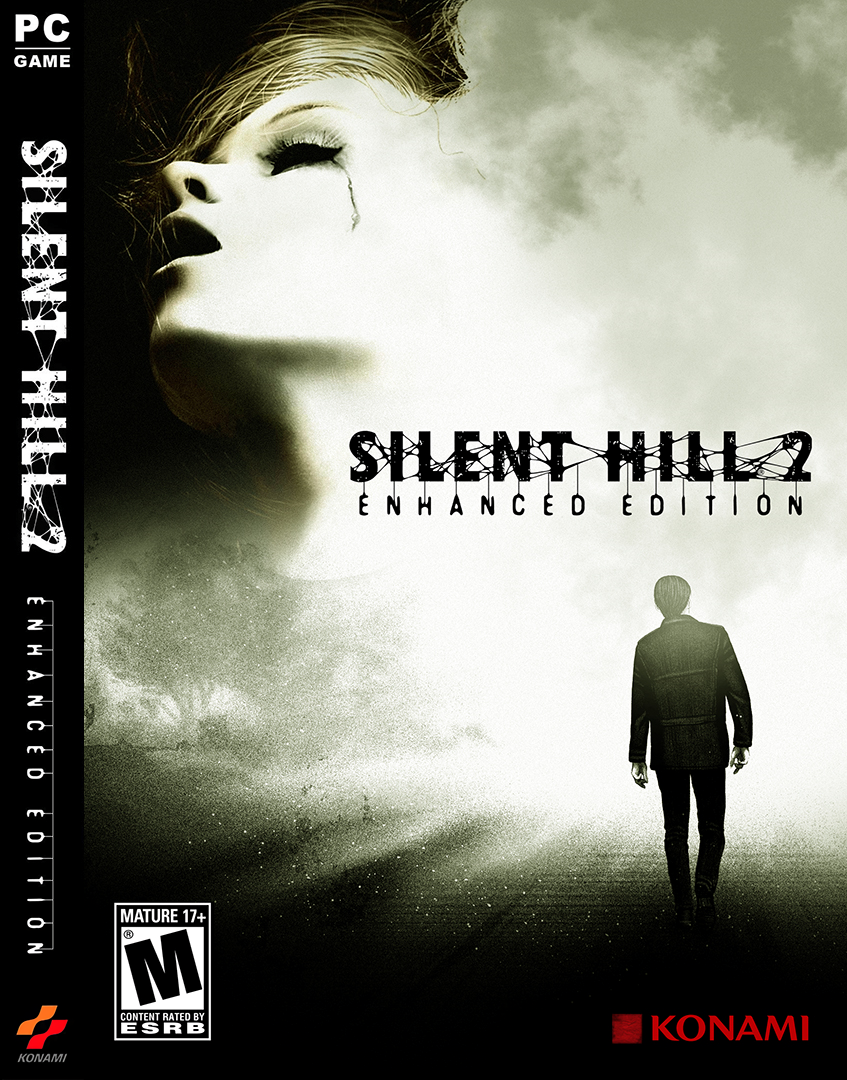
Windows Silent Hill 2: Director's Cut Enhanced Edition (Hack) Windows

CSmith327

Final Form
Repo Curator
Level 5
1%
Joined
Dec 1, 2024
Messages
1,015
Level up in
1485 posts
Reaction score
1,754
Points
4,477
Location
North Carolina, USA
silent-hill-2-enhanced-edition-cover.webp

Download Links​

Game Description:​

Silent Hill 2: Director's Cut is a Survival Horror/Third Person Shooter video game developed by Team Silent and published by Konami released on December 2nd, 2002 for the Microsoft Windows.

The player is cast in the role of James Sunderland, an at first sight normal person who got confused, as anyone else would, when he received a letter from his wife asking him to come to Silent Hill, their special place. The only problem is that his wife died three years ago, and has kept the secrets surrounding her death. James decides to honor the letter's request, wondering if this is a sick joke or if there is more to this. As James reaches the outskirts of the town, he finds that the road is blocked, and parks at an abandoned restroom. Little does he realize that this is the first step forward into the mystery of Silent Hill and his own past.

Silent Hill 2 is a survival horror game. The gameplay is similar to that of the first installment. The player navigates James around the town of Silent Hill and collects weapons, health-restoring items, and objects needed to solve puzzles in an unlimited inventory. A radio alerts James when enemies are near. Like the protagonist of the first game, James is not very skillful in combat; he can fight with basic melee weapons or firearms with scarce ammunition. Most of the puzzles are logic-based and are often shaped like riddles, though there are a few simple inventory-based tasks as well.

While the basic concept is the same as in the previous entry, the game is set in a part of town that was unexplored in it, and the weapons and enemies are mostly new as well. Also new is the ability to change the standard "survival horror" (character-dependent) controls into the more widespread, 3D (camera-dependent) navigation. The difficulty level can be adjusted separately for combat and puzzles.

Note: Silent Hill 2: Director's Cut's main difference from the plain version is that it contains a scenario called "Born from a Wish" also known as the Maria Mini-game. Playing as Maria you find out a bit more about her and her purpose in Silent Hill.

Mod Credits:​

Released by: A sizable collaborative team (full list of credits here)
Type: Full audio/visual enhancement with bug fixes
Version: v1.1.5.0 (Update #10)
Date: 30 Aug 2024

Source and details: https://enhanced.townofsilenthill.com/SH2/about.htm

Silent Hill 2: Enhanced Edition is a project of enhancement packages that makes the PC version of Silent Hill 2 compatible with modern hardware and playable in widescreen aspect ratios, while improving visuals, audio, and bugs.

Features:​

  • High definition game resolutions
  • Widescreen (16:9) camera fixes
  • Upscaled fonts, videos, and images
  • 60 FPS mode with high framerate fixes
  • Restored soft shadows and audio quality
  • Restored fog and post-processing effects
  • Improved controller/mouse support
  • ...and much more

How to Run:​

  1. Extract the folder from the archive to a folder like C:\Games or wherever you like to store your PC games (if using Program Files be sure to run the executables as admin)
  2. Use SH2EEconfig.exe to configure the huge list of various options (most can be left as default but there are a few you might would consider changing, so look through them all)
  3. Make sure Launch using: is pointing to sh2pc.exe and click Save & Launch Game to play
  4. EZ PZ there you go, enjoy
The team has a nice little controller layout guide thing on their page you can check out here for the different controller types. However, you can easily change the button layout in the game options.

Make your options look similar to the screenshot of the graphics options to make them what I think is the best look for it.

 
how can i play Windows game in my Mobile Android? please reply
 
I know Enhanced Edition is just the name of the mod, but it really sounds like this is a mod that changes stuff in the game and not just an compatibility improvement hack.
 
Imo the game felt a little naked with it off, but that's me. Strange that I don't feel that way about film grain/noise in other games. I guess it's a Silent Hill aesthetical sense lol
If I recall it is not even an option in the console versions. I am not sure that SH2 did it, but SH3 has the intensity of the noise effect change strength/intensity situationally in cutscenes if not in game too. It is a deliberate choice in presentation for sure that should be discarded only if you really get distracted by it.
I never even noticed it in my first playthroughs as to me it was subtle, and nobody pointing at screen saying "see that noise?".
 
Of course, I'm aware of the context of your comment. I was saying in general and not for Steam Deck. Like if you had a pretty decent gaming setup or something. Although I have a fairly awful laptop and it stil does 60fps with the rendering resolution set to 2x. It's really the fog stuff that hurts performance more than anything else. So it's good you mentioned those toggles for the fog effects
Yes I am aware adjustments would be made otherwise, obviously.

I just want to make my points very clear, if it's Steam Deck, specifically, this is it folks.
Try x2 all you want, I wouldn't recommend it though, based on experience, the difference is minor but for performance sake you may as well stay at x1.
 
Good stuff, maybe someone still has the Sims games that roamed similar sites before they got that awful re-release. i was literally about to download them the day they came out... talk about bad luck
 
The user was asking based on using a Steam Deck, so the information/tweaks I have provided is based speciically for that..

I personally own this on my main PC, Steam Deck & PS2.
I have played it countless times with Noise Filter enabled, even my very first playthrough, it is my own preference to have this disabled hence forth.
Of course, I'm aware of the context of your comment. I was saying in general and not for Steam Deck. Like if you had a pretty decent gaming setup or something. Although I have a fairly awful laptop and it stil does 60fps with the rendering resolution set to 2x. It's really the fog stuff that hurts performance more than anything else. So it's good you mentioned those toggles for the fog effects
 
That's very good for a significant performance boost, but if you have the hardware capable of the strain of the fog rendering and the higher render resolution then it provides for better quality visuals. The noise effect is optional obviously but I think it suits the game to have it on. Imo the game felt a little naked with it off, but that's me. Strange that I don't feel that way about film grain/noise in other games. I guess it's a Silent Hill aesthetical sense lol
The user was asking based on using a Steam Deck, so the information/tweaks I have provided is based speciically for that..

I personally own this on my main PC, Steam Deck & PS2.
I have played it countless times with Noise Filter enabled, even my very first playthrough, it is my own preference to have this disabled hence forth.
 
No worries, the more people I can expose to this legendary game, the better. enjoy!

Oh and one last thing, just to perfect the settings for performance.

Change the following by launching the: SH2EEconfig.exe
ensure the following Fog setting is set to as per below, so no stuttering occurs.

View attachment 159880

Final step:
Launch the game, go to Options > Advance Options and change the: Render Resolution as per below:
View attachment 159882
That's very good for a significant performance boost, but if you have the hardware capable of the strain of the fog rendering and the higher render resolution then it provides for better quality visuals. The noise effect is optional obviously but I think it suits the game to have it on. Imo the game felt a little naked with it off, but that's me. Strange that I don't feel that way about film grain/noise in other games. I guess it's a Silent Hill aesthetical sense lol
 
The launch option fixed it!
Thanks for this and everyone that helped, and involved on this project.
No worries, the more people I can expose to this legendary game, the better. enjoy!

Oh and one last thing, just to perfect the settings for performance.

Change the following by launching the: SH2EEconfig.exe
ensure the following Fog setting is set to as per below, so no stuttering occurs.

Screenshot_20260305_074601-1.png


Final step:
Launch the game, go to Options > Advance Options and change the: Render Resolution as per below:
Screenshot_20260305_074846.png
 
Last edited:
That's amazing you were a part of that epic project. I hope those guys don't mind it being on here. I didn't see your comment until after typing that last one. Your fix you described makes my comment completely redundant lol But that's a good thing. Thanks for explaining so clearly how to get it to work on Steam Deck. I'm assuming it being made portable like this instead of installed and with registry keys doesn't hurt anything and keep it from running?
Yeah no. It saves inside the game folder and few ini files in root. I kept my "portable" folder over windows installs it is same for either system. I also myself do not use some specific older proton tested just running successfully on Proton CachyOS and ProtonGE latest. I added the two additional DLL files just because they are there, it may be redundant, it may not but no harm in using them it seems. d3d8.dll is the main fix and dinput8.dll is the compatibility to xinput (and others) layer. And yeah the %command% is likely last thing that should be there.

My own personal full launch parameter is to note:
PROTON_NO_FSYNC=1 WINEDLLOVERRIDES="d3d8,dinput8,msvcp70,msvcr70=n,b" PROTON_ENABLE_WAYLAND=1 scb -f -h 2160 -H 2160 -- %command%
So actually a bit more:
"NO_FSYNC=1" if you use newer proton versions. Sync in this case means file accessing and likely memory/file "synchronization". There will be lagginess in sound (best example is menu sounds could play with a delay among others). This is generally a thing to enable in many older games.
WineDLLoverrides: Already went through it but unlike on windows Linux needs to be commanded to load additional or mod middleman dlls.
PROTON_ENABLE_WAYLAND: Helps, as well. It seems. Steamdeck is using wayland, about every gaming linux distro is on wayland, this may also be needed if you use modern proton versions with SH2(EE)
scb: ScopeBuddy. Basically steamscope launcher that automagically fixes stuff like steam overlay. I personally need it just about for every game on my desktop but you may not.
So the full command, generally, for steamdeck etc would be:
PROTON_NO_FSYNC=1 WINEDLLOVERRIDES="d3d8,dinput8,msvcp70,msvcr70=n,b" PROTON_ENABLE_WAYLAND=1 %command%
Post automatically merged:

The launch option fixed it!
Thanks for this and everyone that helped, and involved on this project.
If you feel menu sounds etc being delayed try also PROTON_NO_FSYNC=1 with modern proton versions which would be also generally better. Also the PROTON_ENABLE_WAYLAND=1 thing but yeh hopefully you have good grand time.
 
Tried this on my steam deck with Proton GE, experimental & Hotfix. Unfortunately it just goes to black screen on launch. I think it needs further tinkering. Help?
I recommend trying the following for Steam Deck users:

Set proton to: 7.0-6

Additionally use this Launch Option: WINEDLLOVERRIDES="dinput8,d3d8=n,b" %command%

Make sure you also have both: Protontricks & Wine downloaded from the Discover store
 
Last edited:
"Sumea" is actually in the Enhanced Edition credits part of the credits. Just as a thanks, I just volunteered to bug test a major fix & improvement to the originally buggy sound system. It would break especially hard on multi core processors, being the reason why setting CPU cores manually to one was a thing. To mitigate, not entirely eliminate, the buggy behavior. That was one major fix among others the team has made for this great game and making the CPU affinity "fix" redundant.

If you want to run this on Linux, by adding to steam and using proton you should add at least this line to launch parameters: WINEDLLOVERRIDES="d3d8,dinput8,msvcp70,msvcr70=n,b" - This will make underlying Wine in Proton to load the actual enhanced edition additions successfully. Tools like Nero-UMU or Lutris will let you do this with a GUI. Of course you might also add gamescope and other stuff on Linux but that is required. It is a great version of the game and only one with lossless surround sound capability. Xbox version has Dolby Digital and PS2 version was made without surround (or has hidden pro logic logic I never noticed).
That's amazing you were a part of that epic project. I hope those guys don't mind it being on here. I didn't see your comment until after typing that last one. Your fix you described makes my comment completely redundant lol But that's a good thing. Thanks for explaining so clearly how to get it to work on Steam Deck. I'm assuming it being made portable like this instead of installed and with registry keys doesn't hurt anything and keep it from running?
 
Does worth playing it by playing the ps1 one?
Hello,

Yes i'd say it's certainly worth a run through, I did so after I beat 2.

For those unaware and don't know where to start. playing SH2 first is fine, you do not need prior knowledge of the first game on PS1. It is a standalone, isolated story, just only set in the same town.

My personal opinion is, SH2 is far more creepier, has a more interesting, personal story & the symbolism is just god-tier, you'll realize this all the more in: New Game + trust me on that.
 
Tried this on my steam deck with Proton GE, experimental & Hotfix. Unfortunately it just goes to black screen on launch. I think it needs further tinkering. Help?
Try launching the setup exe that's also in the folder. If it'll let you pick Repair choose to install the Wine/Linux fix and see if that does anything. I already had the .dll that worked with it installed just in case, but it seems to not do much if that option is installed on Windows. It does something to hook into the Wine Mono runtime or something once that option is picked in the setup but on Windows that Wine stuff isn't installed so that process does nothing during the setup. Of course Wine through Linux and Steam Deck don't behave exactly the same. You're welcome to completely reinstall it using the setup tho. It requires at least 7.6 gb or so of free space to do the install and it downloads the files for the install first (about 3.68 gb of a download for it) Maybe even the resolution being defaulting to 1920x1080 in the game settings would cause it to be black screen. I dunno. Hopefully some of you guys with Steam Deck experience can help? I don't own one and just use Windows 10
 
"Sumea" is actually in the Enhanced Edition credits part of the credits. Just as a thanks, I just volunteered to bug test a major fix & improvement to the originally buggy sound system. It would break especially hard on multi core processors, being the reason why setting CPU cores manually to one was a thing. To mitigate, not entirely eliminate, the buggy behavior. That was one major fix among others the team has made for this great game and making the CPU affinity "fix" redundant.

If you want to run this on Linux, by adding to steam and using proton you should add at least this line to launch parameters: PROTON_NO_FSYNC=1 WINEDLLOVERRIDES="d3d8,dinput8,msvcp70,msvcr70=n,b" PROTON_ENABLE_WAYLAND=1 %command% - This will make underlying Wine in Proton to load the actual enhanced edition additions successfully, as well as fix few things while using more modern proton versions. Tools like Nero-UMU or Lutris will let you do this with a GUI. Of course you might also add gamescope and other stuff on Linux but that is required. It is a great version of the game and only one with lossless surround sound capability. Xbox version has Dolby Digital and PS2 version was made without surround (or has hidden pro logic logic I never noticed).
 
Last edited:
Tried this on my steam deck with Proton GE, experimental & Hotfix. Unfortunately it just goes to black screen on launch. I think it needs further tinkering. Help?
 
Damn it I forgot to remove the "the" before Microsoft Windows. Now the forum post is gonna be stuck with it. I can fix the game page one tho
 

Users who are viewing this thread

Connect with us

Support this Site

RGT relies on you to stay afloat. Help covering the site costs and get some pretty Level 7 perks too.

Featured Video

Latest Threads

What are your favorite albums?

I listen to a LOT of different albums, and I'm just curious. 3 of my favorites ever (limiting 1...
Read more

Hanabie- Otaku Lovely Densetsu

Thoughts on Wolverine [Insomniac Games]?


Looks super-immersive. Like they've found the right blend of cinematic and...
Read more
Back
Top