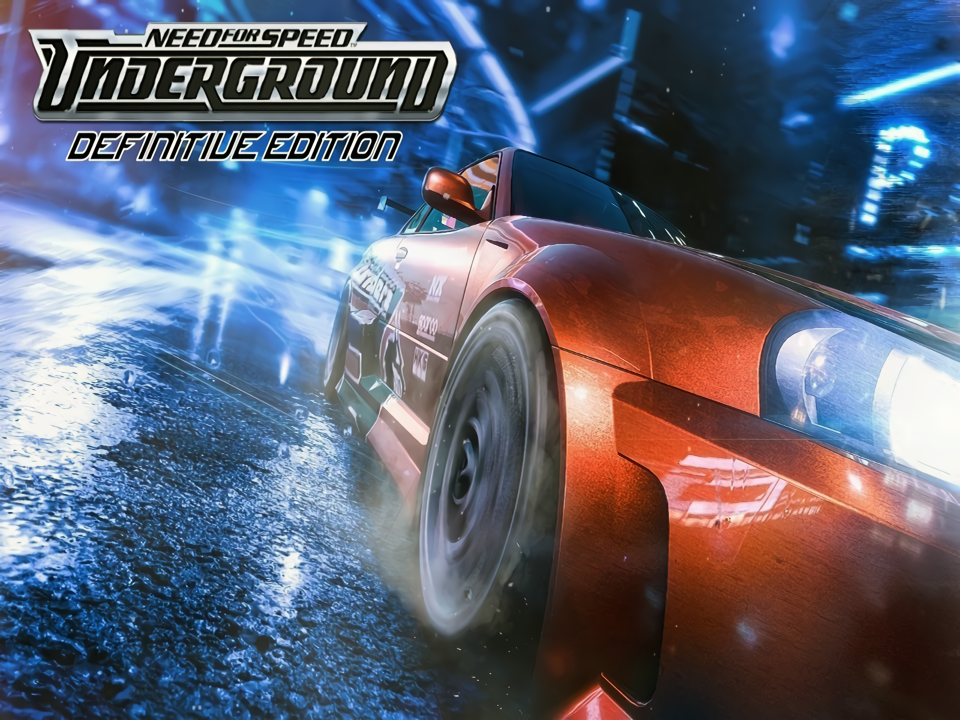
Windows Need for Speed: Underground Definitive Edition (Hack) Windows

CSmith327

Final Form
Repo Curator
Level 5
1%
Joined
Dec 1, 2024
Messages
1,014
Level up in
1486 posts
Reaction score
1,750
Points
4,477
Location
North Carolina, USA
need-for-speed-definitive-edition.webp

Download Links​

Game Description:​

Need for Speed: Underground is a Racing video game developed by EA Black Box and published by Electronic Arts released on November 17th, 2003 for Microsoft Windows.

This is a completely modded version featuring several highly recommended mods and fixes from the community. The most noticeable one from this post being the Definitive Edition high resolution texture replacement mod. The mod keeps the vanilla look of the game but increases the quality of the visuals for a more hires look. Anther mod to increase the visual quality is the Remastered UI mod. This includes several QOL fixes for running on Windows 10/11 and is probably the best way to play the game through PC.

Featured Mods:​

Need for Speed Definitive Edition by Stre1itzia - World and road texture replacements to make the game have a more high res look without changing the overall feel too much

Remastered UI by Plajer - High res recreation of NFSU's UI and HUD

8K Skyboxes by Plajer - High quality 8k resolution skyboxes based on the vanilla look

HD Decals by Plajer - All decals replaced by high quality HD recreations based on the originals (decals not vinyl)

NFS HD Reflections by Aero_ - Higher quality autores scalable HD reflections

NFS HD Content Support by Aero_ - Improves support for high res content (needed for the other mods)

[NFSU] Extended Customization by ARCHIE - Adds a little more tweaking to the customizations (check the page for more info) Note: this mod might cause bugs and may need to be removed after I've done further testing, but it seems fine atm

NFS Underground: Extra Options+ by Crab Gazette & ExOpts team - Customizable script that allows editing of several game properties (read page for more info)

NFSU XtendedInput by xan1242 (Lovro Pleše) - Plugin script to bring xinput support to NFSU games

Widescreen Fixes Pack by ThirteenAG - Fixes for running the game and displaying the FMVs for widescreen higher resolution displays

ZPatch Underground by Zolika1351 - Plugin that fixes the random crashes that sometimes happen when saving

How to Run:​

  1. Extract the archive to wherever (it doesn't really matter but if using a protected folder like Program Files be sure to run with Admin privileges)
  2. To enable vibration support in the game install the xi.win7.x64.en.msi setup (x86 if using 32bit system) using the Troubleshoot Compatibility option from the right click menu in Win 10 and clicking Test the program... Chose for custom install and uncheck the install of features for the controller settings of controllers you don't need (I only picked the top two for Xbox since I don't have any of the others) when Windows asks if you want to apply the compatibility settings after you're done installing just ignore and cancel it. Win 11 users may need to set compatibility to Win 7 since the Test the program option is unavailable in it. (sorry, the vibration is weak and there's no way to configure the strength)
  3. Launch the game using Texmod.exe by setting the target application to Speed.exe and the Package as the .tpf file. It takes a few minutes for the game to load since it's loading the textures (this is normal)
  4. Resolution and FMV cropping options can be changed by editing the NFSUnderground.WidescreenFix.ini file in the scripts folder.
  5. Unlike the NFSU2 XtendedInput, in this game the controls can be changed for the controller by clicking JoyPad in the controller settings and mapping them how you like
  6. You can edit various properties of the game using the different scripts but how I have it seems best unless you want to trick it out even further
  7. In the display options of the game make sure they match like the page in my screenshots so that the game will look how it should with these mods.
Note: I know it's annoying and you'd rather not have to wait like how it would be to be on a long loading screen for the game to start, but if you just load the game through Speed.exe and not Textmod then you won't have the correct modded look and you'd be better off playing the plain PC version unmodded. If you'd like to have a plainer looking version of this game, then you can find the last MagiPack version of it in this torrent. Use qBittorent for it, it's the torrent client I always recommend to people.
 
Last edited:
Running on my Ryzen 5700x RTX 3080 with 16gb of DDR 4 ram. Followed the instructions and it plays flawlessly. This remaster looks amazing on my LG OLED monitor the game still holds up.
Post automatically merged:

Yeah, i first tried through Texmod.exe.
The Texmod.exe itself works correctly, but when it tries to open speed.exe, it crashes the same way.


I'm not sure what's the reason either.

If anyone else on Win11 encounters a similar issue, it would be helpful if you could share that here.
Also, if anyone has successfully run it on Win11, please let us know here as well.
I'm running it on Windows 11 24h2, it takes about a minute to load all of the mods, but other than that it runs perfectly on my machine. I'm running a RTX 3080 Ryzen 5700X and 16gb of G-Skill DDR4 ram. I've played for four hours now with no crashes, hitches, or stutters, the game looks amazing this mod is dope.

If people have issues with this game it could be because some of them are trying to run NFSU on AMD Radeon graphics which drivers aren't known for great compatibility for older games or people are trying to use intel integrated graphic chips on a potato machine.
 
Last edited:
I found the issue...
It was related to scripts\NFSUnderground.WidescreenFix.ini
My PC couldn't handle the default 1920x1080 resolution.
I lowered it and it started working fine! ::peacemario
 
Maybe setting compatibility mode under properties for speed.exe to Windows 7 or XP would help? But problem with that would be that the change wouldn't be processed through Texmod. Unless maybe Texmod was forced to run in compatibility mode as well? I dunno. Old 2000s and 90s programs are finicky on modern Windows without dozens of fixes and patches and compatibility layer junk
Yeah, already tried many different combinations of compatibility mode.
No luck...
 
Yeah, i first tried through Texmod.exe.
The Texmod.exe itself works correctly, but when it tries to open speed.exe, it crashes the same way.


I'm not sure what's the reason either.

If anyone else on Win11 encounters a similar issue, it would be helpful if you could share that here.
Also, if anyone has successfully run it on Win11, please let us know here as well.
Maybe setting compatibility mode under properties for speed.exe to Windows 7 or XP would help? But problem with that would be that the change wouldn't be processed through Texmod. Unless maybe Texmod was forced to run in compatibility mode as well? I dunno. Old 2000s and 90s programs are finicky on modern Windows without dozens of fixes and patches and compatibility layer junk
 
Supposed to use Texmod to launch the game by applying the .tpf package to it and clicking Run. But it shouldn't crash upon trying it from speed.exe tho. You just wouldn't have the textures right if you ran it from that using speed.exe alone.
Yeah, i first tried through Texmod.exe.
The Texmod.exe itself works correctly, but when it tries to open speed.exe, it crashes the same way.

I just checked just now on mine and speed.exe didn't crash. The files should be the same since I just zipped it up and uploaded it. There's no installation or registry keys needed for to work either. Maybe it's Win 11? Or some older vcredist or something dependency you're missing? I use Windows 10
I'm not sure what's the reason either.

If anyone else on Win11 encounters a similar issue, it would be helpful if you could share that here.
Also, if anyone has successfully run it on Win11, please let us know here as well.
 
speed.exe crashes for me before opening any window... ::sadkirby

Seeing that other users didn't report such a thing, probably something is wrong with my PC. (it's win11 btw)
Supposed to use Texmod to launch the game by applying the .tpf package to it and clicking Run. But it shouldn't crash upon trying it from speed.exe tho. You just wouldn't have the textures right if you ran it from that using speed.exe alone. I just checked just now on mine and speed.exe didn't crash. The files should be the same since I just zipped it up and uploaded it. There's no installation or registry keys needed for it to work either. Maybe it's Win 11? Or some older vcredist or something dependency you're missing? I use Windows 10 on my laptop
 
speed.exe crashes for me before opening any window... ::sadkirby

Seeing that other users didn't report such a thing, probably something is wrong with my PC. (it's win11 btw)
 
Don't download this. It's super broken. I've been spending the past several hours fixing it. I'm almost ready to rezip and upload it.
Oh ok, thank you! Appreciate you for taking the time to not only fix it but also let me know ::thank-you::heart
 
Any update on this? I couldn't find much info online. I ended up replacing all the files inside within the wheels folder (geometry.bin, texture.bin, and vinyls.bin) with the vanilla game files. Replacing just the geometry.bin file did not work for me.
Download the post again. I fixed it completely by using a repack someone made of the mod already installed to it and then fixed it further since they had the Russian videos in it and other things had to be touched up. I edited the post description to reflect the changes too. So read that too please if you will. I've played in Underground mode for hours and everything seems to be fine minus the glitchy textures that can be fixed by Alt-tabbing out of the game (that's a known issue with the mod and the mod author mentions it in the original download for the mod)
edit: also the reason replacing geometry.bin didn't fix it was because all three files in the wheels folder had to be replaced and not just that one, but you shouldn't use the previous uploaded files for this since they were broken and crashed every time the game autosaved. This new download from last night has that fixed from what I can tell so far
 
Just learned the Definitive Edition messes up wheels to always be blue no matter what rim color you change them to. I'm working on figuring out how to fix this without sacrificing the whole mod. The cause is the NFSU folder/Cars/Wheels/GEOMETRY.BIN file that is used by the mod
Any update on this? I couldn't find much info online. I ended up replacing all the files inside within the wheels folder (geometry.bin, texture.bin, and vinyls.bin) with the vanilla game files. Replacing just the geometry.bin file did not work for me.
 
Does this work on steam deck?
Run Texmod.exe using Proton and in it set the target application to Speed.exe and the Package as the .tpf then click Run. Rumble doesn't work, but you honestly wouldn't want it to since it's overly rough and intense and sometimes still gets stuck vibrating in menus. The game will take close to almost 5 minutes to start but that's normal since Texmod is temporarily injecting the textures into it. You might wanna edit the game X and Y resolution to what the Steam Deck is instead of 1920x1080. You can do that in the widescreenfix.ini through a text editor
 
I fixed it now. This version should be more stable than the last ones. Before the game would keep crashing after pressing Continue on completing a race. Now that seems to be fixed. I've tried several races in career mode and it hasn't happened again. I couldn't figure out how to get the engine accent and brake caliper paint to work but honestly you can't really see them in the game much anyways. At least not when racing. I had to get rid of the Remastered UI mod since it was overwriting the menu graphics of the Definitive Edition mod (which actually already had a cleaned up UI) and the 8k skyboxes since Definitive Edition had its own version of that too. I also got rid of the extra options and zpatch scripts too. The modding of this game seems to be a lot more unstable than mods for NFSU2. That might be the reason why this game has so few mods available compared to other NFS games even tho it's one of the more popular ones. Tell me if you guys have any more glaring and noticeable issues. IMO I think getting the MagiPack version and applying Plajer's Remastered UI, HD Decals, and 8k Skyboxes to it would be the best version to get. It won't have the textures of this but it'll be remastered looking enough and be more stable
 
Is there any way to increase the AA in this game?
From what I've looked through the game graphics and display settings and the mod scripts I couldn't find anything for anti aliasing. You'll have to use the settings for whatever graphics card you use (like Nvidia Control Panel for Nvidia) and change your settings to override or enhance the game and hope that the changes actually work with it.
Post automatically merged:

Has anybody had any glaring issues with this game or UG2? I've not had any issues at all with UG2 and I've been playing the career mode in it using all the mods and texture pack. I've already played several hours into it and the only issue is that the replay view function for races doesn't work. That can't be fixed since it's caused by mods that would break the game if removed. But I can't say the same for this post. Since I've been playing the other game so much I've not really tested this one as much as I should have. I'll test it today and see if it's messed up and I just overlooked it since I didn't go into Underground mode or customize anything
Post automatically merged:

Just learned the Definitive Edition messes up wheels to always be blue no matter what rim color you change them to. I'm working on figuring out how to fix this without sacrificing the whole mod. The cause is the NFSU folder/Cars/Wheels/GEOMETRY.BIN file that is used by the mod
 
Last edited:
need-for-speed-definitive-edition.webp

Download Links​

Game Description:​

Need for Speed: Underground is a Racing video game developed by EA Black Box and published by Electronic Arts released on November 17th, 2003 for Microsoft Windows.

This is a completely modded version featuring several highly recommended mods and fixes from the community. The most noticeable one from this post being the Definitive Edition high resolution texture replacement mod. The mod keeps the vanilla look of the game but increases the quality of the visuals for a more hires look. Anther mod to increase the visual quality is the Remastered UI mod. This includes several QOL fixes for running on Windows 10/11 and is probably the best way to play the game through PC.

Featured Mods:​

Need for Speed Definitive Edition by Stre1itzia - World and road texture replacements to make the game have a more high res look without changing the overall feel too much

Remastered UI by Plajer - High res recreation of NFSU's UI and HUD

8K Skyboxes by Plajer - High quality 8k resolution skyboxes based on the vanilla look

HD Decals by Plajer - All decals replaced by high quality HD recreations based on the originals (decals not vinyl)

NFS HD Reflections by Aero_ - Higher quality autores scalable HD reflections

NFS HD Content Support by Aero_ - Improves support for high res content (needed for the other mods)

[NFSU] Extended Customization by ARCHIE - Adds a little more tweaking to the customizations (check the page for more info) Note: this mod might cause bugs and may need to be removed after I've done further testing, but it seems fine atm

NFS Underground: Extra Options+ by Crab Gazette & ExOpts team - Customizable script that allows editing of several game properties (read page for more info)

NFSU XtendedInput by xan1242 (Lovro Pleše) - Plugin script to bring xinput support to NFSU games

Widescreen Fixes Pack by ThirteenAG - Fixes for running the game and displaying the FMVs for widescreen higher resolution displays

ZPatch Underground by Zolika1351 - Plugin that fixes the random crashes that sometimes happen when saving

How to Run:​

  1. Extract the archive to wherever (it doesn't really matter but if using a protected folder like Program Files be sure to run with Admin privileges)
  2. To enable vibration support in the game install the xi.win7.x64.en.msi setup (x86 if using 32bit system) using the Troubleshoot Compatibility option from the right click menu in Win 10 and clicking Test the program... Chose for custom install and uncheck the install of features for the controller settings of controllers you don't need (I only picked the top two for Xbox since I don't have any of the others) when Windows asks if you want to apply the compatibility settings after you're done installing just ignore and cancel it. Win 11 users may need to set compatibility to Win 7 since the Test the program option is unavailable in it. (sorry, the vibration is weak and there's no way to configure the strength)
  3. Launch the game using Texmod.exe by setting the target application to Speed.exe and the Package as the .tpf file. It takes a few minutes for the game to load since it's loading the textures (this is normal)
  4. Resolution and FMV cropping options can be changed by editing the NFSUnderground.WidescreenFix.ini file in the scripts folder.
  5. Unlike the NFSU2 XtendedInput, in this game the controls can be changed for the controller by clicking JoyPad in the controller settings and mapping them how you like
  6. You can edit various properties of the game using the different scripts but how I have it seems best unless you want to trick it out even further
  7. In the display options of the game make sure they match like the page in my screenshots so that the game will look how it should with these mods.
Note: I know it's annoying and you'd rather not have to wait like how it would be to be on a long loading screen for the game to start, but if you just load the game through Speed.exe and not Textmod then you won't have the correct modded look and you'd be better off playing the plain PC version unmodded. If you'd like to have a plainer looking version of this game, then you can find the last MagiPack version of it in this torrent. Use qBittorent for it, it's the torrent client I always recommend to people.
Is there any way to increase the AA in this game?
 
OK, now how to install rumble features? I've tried it myself, and it's not working.
It only works for Windows since it's a fix for the xinput in Windows. Some Japanese guy made a patch fix that adds rumble to certain xinput enabled controllers. I don't think it'll work on anything Linux based. Trust me you don't want rumble in the PC version of this game. It's way overly too intense. It doesn't match the console version rumble at all. Like just barely steering the car just a tiny bit from the analog deadzone makes the rumble go crazy. I had to disable the vibration in the settings since it's just super irritating more than anything else.
edit: maybe vibration will work for you but you'll need to make sure it's toggled as on in the game settings. It's off by default
Post automatically merged:

@Vesthal I added how to get other languages as a note at the end of both Underground 1 and 2 posts. You can use the mod linked there to make this version be in Italian. Delete the movie files that are for the other languages to save space with it
 
It's Awesome

Please make something like this for carbon or most wanted
 
Yeah, I'm gonna have to replace this. I didn't realize that the movies files from Definitive Edition would be in Russian. I should have figured since the author of the mod is from the Republic of Moldova. But they didn't mention that it was in a different language anywhere. I'll replace the ones using the Corepack one like you said. I found it in an old torrent
Post automatically merged:


Yeah Texwizard would be amazing but I don't have the means to figure out all the pointers that the json needs. The mod tpf would have to be extracted and completely reconfigured to work with it and I'd have to figure out each texture to list. It would nice if someone who's used that before could help with this, since that would shave off the 3 to 5 minutes of load time it takes Texmod to load it. We could use it for both games too

I've spent several hours trying to figure it out, ha, and I'll totally share if it gets solved. TPFextract GUI is easy to find, that extracts the tpf and spits out a folder of textures and a texmod.def (texmod pointer telling what game texture to replace with what tpf texture, probably in a specific order). The texwizard wiki links to a packer tool (which looks a lot like Binarius in its style fwtw). I can 'make a new texture pack', add a node, and select textures from following the wiki instructions, but I have no idea what file to reference (I'm guessing the file that has textures which these will replace). Texmod only references the main exe, and every texmod texture is named with a 'SPEED.EXE_' prefix, followed by a hash number suffix. Using (probably wrong) default from the reference file picker, I get a bin and meta.json file in the textures folder, but the game insta-crashes when I try them.

SO I can make a bin and meta.json, but they're not pointing to the right thing, or the textures are improperly named. I tried a couple different ways and got insta-crashes each time. And FWIW, in bin format, they don't compress, so the bin is around 600mb (not a big deal, but worth noting). Should load faster being uncompressed, that said.

And yeah, if anyone has any idea or just so happens to be a pro NFS modder, feel free to teach us something heh.
 
Yeah, I'm gonna have to replace this. I didn't realize that the movies files from Definitive Edition would be in Russian. I should have figured since the author of the mod is from the Republic of Moldova. But they didn't mention that it was in a different language anywhere. I'll replace the ones using the Corepack one like you said. I found it in an old torrent
Post automatically merged:

Am playing without Texmod per usual (always gives me grief, etc), but might try playing around with Texwizard which could replace that with a nice asi script, but involve unpacking the Texmod package and then making a json with pointers...or something like that.
Yeah Texwizard would be amazing but I don't have the means to figure out all the pointers that the json needs. The mod tpf would have to be extracted and completely reconfigured to work with it and I'd have to figure out each texture to list. It would nice if someone who's used that before could help with this, since that would shave off the 3 to 5 minutes of load time it takes Texmod to load it. We could use it for both games too
Post automatically merged:

The post has been updated with the English movies and a little additional note about how to get other languages working with the files from this post
 
Last edited:
Do you got a link for that repack? I didn't try any further than the quick race in this (which was dumb of me) but I've been spending a lot of time with NFSU2 since I've never properly played it until now (I have years before but never in a serious capacity) I love UG1 and I used to play it religiously but now I'm starting to think UG2 might be the better game. I like the courses in UG2 better than in 1 since they feel like they have more depth and are more challenging. I love the soundtrack in UG1 a lot more tho. At least UG2 had a Queens of the Stone Age song.

Bro if you bothered to read you wouldn't need to ask that. I mentioned Windows 11 twice in the description. Yes this game works fine in Windows 11
Dont a cheeky B ive no time for it. Can stick the game up your rear end for all i care lol. I help people flat out on here first time ive even seen you don't think your gonna be talking down to me.
 
Beware: There have been no replies in this thread for 90 days.
Keep that in mind when expecting a reply from the people on it,
You can also start a new thread instead. This is just a heads-up, bumping is allowed in this forum.

Users who are viewing this thread

Connect with us

Support this Site

RGT relies on you to stay afloat. Help covering the site costs and get some pretty Level 7 perks too.

Featured Video

Latest Threads

SEGA decides to get busy...

So, everyone's already been talking about the Crazy Taxi...
Read more

Games similar to Valkyrie Profile 2: Silmeria?

I'm having a blast with this game. I'm not even halfway through it yet, but I know for a fact...
Read more

Cartoon Trope you are surprised it is canon to reality?

Cartoons, part of their fun is seeing impossible stuff happen onscreen, but sometimes, something...
Read more

Your brawler/beat'em up/hack n slash mains

Needed to make a counterpart to the fighter mains. Don't matter if it's a 2D, 2.5D, or 3D...
Read more

Goblins

Twice is a coincidence, three's a pattern, and I've noticed an uptick in goblin employment over...
Read more

Online statistics

Members online
79
Guests online
1,313
Total visitors
1,392

Forum statistics

Threads
19,776
Messages
501,083
Members
926,794
Latest member
virus_305

Today's birthdays

Advertisers

Back
Top