Amiga Bubble Heroes (PC) Amiga

CSmith327

Final Form
Repo Curator
Level 5
1%
Joined
Dec 1, 2024
Messages
1,014
Level up in
1486 posts
Reaction score
1,749
Points
4,477
Location
North Carolina, USA
bubble-heroes-cover.webp

Game Description:​

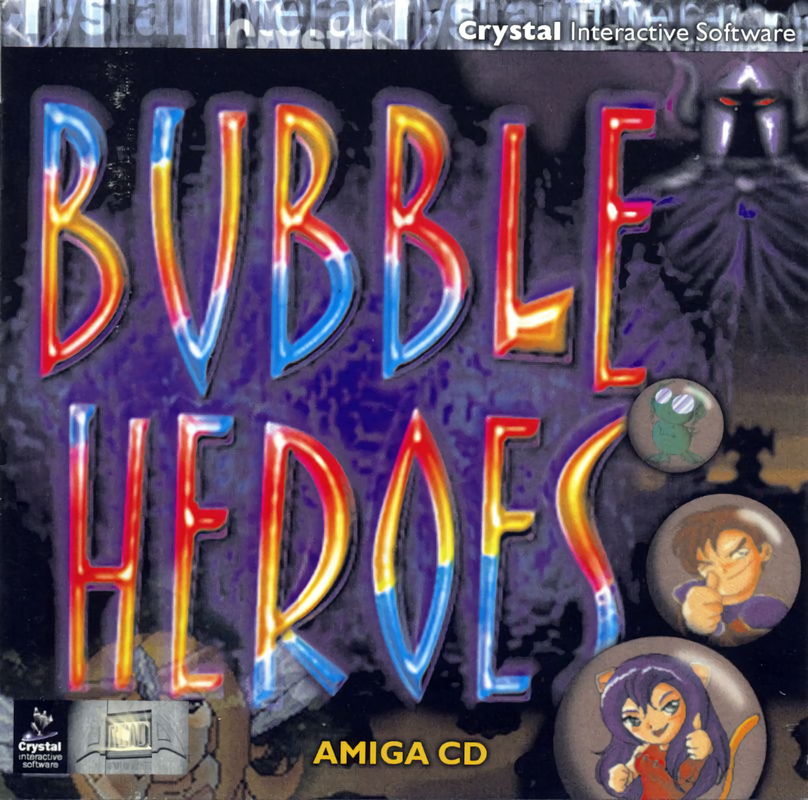
Bubble Heroes is a Puzzle video game published by Crystal Interactive Software and developed by ArcadiA Developments released on July 23rd, 2000 for the Amiga.

This game is a cute Bust-A-Move/Puzzle Bobble clone with a fantasy anime theme with cutscenes and voice acting. It's a very charming game and some may find it more enjoyable than actual Puzzle Bobble. At least one magazine reviewer back in 2000 seemed to think so.

There are 3 game modes: Story, Championship (both single-player) and Death Match (two players). The player must also pick a character before the start of the action proper, each with their own special power: a brave knight, a cat girl or a prince turned into a frog.

The Story mode tells you about the planet Radya and the four nymphs that need to be freed from the evil Gonzul. There are four worlds, each divided into two areas of five levels each. Most levels require the player to remove all the bubbles on screen without any of them reaching below a certain point, but some other level play a bit differently and require the player to free a nymph from the bubbles surrounding her. The last level of each world is played against a boss.

The Championship mode offers duels against all the characters from the game as AI opponents.

The Death Match mode let two players compete against each other, shown side by side on the screen.

This game is a CD-ROM game that is different from Amiga CD32 or CDTV games and is supposed to be played using an Amiga model PC like A1200 or A4000 (with enough chip ram of course)

The manual is included in the download but it doesn't really say much that's a need to know. Unless maybe if you're using a real Amiga.

How to Run:​

(Using WinUAE) - or FS-UAE
  1. You can play this using the WinUAE version I uploaded to the repo since it's already configured to work with this game and has all the necessary files required. If you want to use FS-UAE you can also repurpose those files and create a configuration for it as well if you're using Linux or something that can't natively run WinUAE but can run FS-UAE.
  2. Move the BH folder and BH.info files into the shared PC folder (ClassicWB UAE v28\PC)
  3. Load the A4000 configuration and after it's booted up press F12 and in the CD drives settings load the .cue file for this game and it will appear on the desktop.
  4. Open the files for the game that you moved into your PC folder as shown in the first screenshot (you don't have to open the BHCD files I was just showing them) and click the executable there.
  5. When asked for a CD device option like in the second screenshot click the only option and then click Let's play.
  6. When asked for what screenmode to use choose the 3rd option in the list like in the third screenshot. If you want to play in a small window you can pick the 1st option to use the RTG PIP mode. It's kinda tricky to be able to get the window to move but it's possible if you mess around with WinUAE and the mouse
  7. The game will now start just fine, and you can have fun checking it out.
To fix the screenmode select if it has an error you can edit the RtgScreenMode.prefs file in the BH folder to clear off the option in it and try again.

Note: if you want to play using your own Amiga or Workbench install you might need to do a fresh install of the game using the installer on the disc.

Download Links​

 
Last edited:
Seems like what I should have added to the repo instead of the mess that I did. I'll check those out soon. Thanks for the help and suggestions. I also already don't like the powerpc stuff after having messed with it all night earlier. Now I know why people focus on the pre 4.1 versions since it ruins being able to play the games that are actually good on the system.
edit: do I choose to install the game to hard drive with the full install option and use that to create an .hdf? But what about the audio tracks?
Just saw your edit. It won't work that way. You'll need to create a whdload version of the game, setting a bypass instruction on the .slave to look for the .cue inside that folder's whdl and not the cd tray. That is more a programming skill than an emulation skill.

For a cool workaround, you can create a small clean freshly installed bootable 3.1 workbench HDF, load that in the emu, install the game, keep the .cue loaded in the virtual cd tray, and save that config.

Then go to s: startup-sequence to add a line to launch puzzle heroes from startup.

You'll end up with an hdf that will load straight into the game to use in Retroarch or wherever.

All that if you want a standalone hdf for bubble heroes that will load blazing fast.

If you want the Amiga experience all together nice and clean, grab the amigavision, or any preconfigured hdf image, or create yours from scratch, adding all games you want manually, and puzzle heroes as a normal install and cd tray cue, and then use AGS as a front end/launcher to launch all from the same place. Add AGS as the app to load in startup-sequence, and voila... launch everything with a double click on the .fsuae file on standalone emu (or from the hdf in retroarch),

Just try to keep it A1200, since A4000 is much heavier to emulate and users might need a better box, plus some games will run faster, screwing the experience, etc, etc, etc, as said before.
Post automatically merged:

fs-uae-full-2603131542-01.png

Post automatically merged:

Shame to launch directly, game's got a fantastic icon, lol.
 
Last edited:
All cool.

Some hdfs are spread all over in different pages, etc. But many games are not in hdf, so you can use this to convert them:


About Wipeout, I don't use any OS beyond 3.1. All others after that are a different thing because they were developed after Commodore sold the company circa 1997. Moreover, I don't like the powerpc amigas which are the ones that use 4.1 if I remember well. I prefer the classic stuff always, but I could try to figure it out when I have the time, no problem. Anything post 3.1 is more problematic for classic games, that is why I avoid them.

On a different thing, you could try amigavision, some dudes took the time to manualy configure all the .slaves of 3000 games, with perfect settings, it is a joy to play the classic games with their settings.
Seems like what I should have added to the repo instead of the mess that I did. I'll check those out soon. Thanks for the help and suggestions. I also already don't like the powerpc stuff after having messed with it all night earlier. Now I know why people focus on the pre 4.1 versions since it ruins being able to play the games that are actually good on the system.
edit: do I choose to install the game to hard drive with the full install option and use that to create an .hdf? But what about the audio tracks?
 
Well at least you're being respectable about it. I agree that FS-UAE is the better emulator. I didn't know .hdf versions of this existed or where to get them at or if it's something you would have to generate yourself. If you can point me to them I'll redo the entire post with it. Also maybe you can help me with this? Sorry for blowing up at you earlier, it kinda pissed me off that you said I was being inadequate with my methods (you weren't wrong tho) since I had invested a lot of time in it. I also didn't understand your initial instructions since I only saw them for a minute until it was gone when I refreshed the page.
All cool.

Some hdfs are spread all over in different pages, etc. But many games are not in hdf, so you can use this to convert them:


About Wipeout, I don't use any OS beyond 3.1. All others after that are a different thing because they were developed after Commodore sold the company circa 1997. Moreover, I don't like the powerpc amigas which are the ones that use 4.1 if I remember well. I prefer the classic stuff always, but I could try to figure it out when I have the time, no problem. Anything post 3.1 is more problematic for classic games, that is why I avoid them.

On a different thing, you could try amigavision, some dudes took the time to manualy configure all the .slaves of 3000 games, with perfect settings, it is a joy to play the classic games with their settings.
 
Last edited:
Grab the .hdf versions of the games and play them with retroarch's core puae. Simple and fast like that. No workbench, no hassle.

Now if you want the best emulation possible, use fs-uae, with a 1200 machine, the config you have on your posts with a 4000 will make the games run faster than the originals in different parts, among many other problems. Guess you could just change winuae to a 1200 config, but in the end, fs uae is way more accurate in my humble opinion.

I've been emulating for 30 years now, all systems, consoles, handhelds, arcades, pcs, etc, in all architectures, and so many devices, I can gladly help you whenever you may want so you can invest less time and maybe provide higher quality advice to people, with all due respect.

P.S. I deleted my original comment, before you replied because I didn't want to start an argument, but you replied anyway, so ok... cool man.
Well at least you're being respectable about it. I agree that FS-UAE is the better emulator. I didn't know .hdf versions of this existed or where to get them at or if it's something you would have to generate yourself. If you can point me to them I'll redo the entire post with it. Also maybe you can help me with this? Sorry for blowing up at you earlier, it kinda pissed me off that you said I was being inadequate with my methods (you weren't wrong tho) since I had invested a lot of time in it. I also didn't understand your initial instructions since I only saw them for a minute until it was gone when I refreshed the page.
 
Last edited:
@kanjifreak wellll excuse me then. I'm not an Amiga expert and I'm trying the best I freaking can. I don't know all the tricks and loopholes and software shortcuts since I'm new to the system and didn't grow up with it or spend several years of time with it. I'm giving the instructions that are the ways I've found to make the games work. If they're "overly complicated and unnecessary" then I'm not sorry since I've been spending several hours and days of my time trying to be perfect using what knowledge I do know. I could just post games with only generic info about the game and not what to do with the files. But if I did that then people would either just ignore this even more or constantly ask what to do in the comments. I didn't even know there was a way to run this completely without Workbench since there was no information online saying how to do so (maybe in a forum somewhere)
Grab the .hdf versions of the games and play them with retroarch's core puae. Simple and fast like that. No workbench, no hassle.

Now if you want the best emulation possible, use fs-uae, with a 1200 machine, the config you have on your posts with a 4000 will make the games run faster than the originals in different parts, among many other problems. Guess you could just change winuae to a 1200 config, but in the end, fs uae is way more accurate in my humble opinion.

I've been emulating for 30 years now, all systems, consoles, handhelds, arcades, pcs, etc, in all architectures, and so many devices, I can gladly help you whenever you may want so you can invest less time and maybe provide higher quality advice to people, with all due respect.

P.S. I deleted my original comment, before you replied because I didn't want to start an argument, but you replied anyway, so ok... cool man.
 
@kanjifreak wellll excuse me then. I'm not an Amiga expert and I'm trying the best I freaking can. I don't know all the tricks and loopholes and software shortcuts since I'm new to the system and didn't grow up with it or spend several years of time with it. I'm giving the instructions that are the ways I've found to make the games work. If they're "overly complicated and unnecessary" then I'm not sorry since I've been spending several hours and days of my time trying to be perfect using what knowledge I do know. I could just post games with only generic info about the game and not what to do with the files. But if I did that then people would either just ignore this even more or constantly ask what to do in the comments. I didn't even know there was a way to run this completely without Workbench since there was no information online saying how to do so (maybe in a forum somewhere)
 

Users who are viewing this thread

Connect with us

Support this Site

RGT relies on you to stay afloat. Help covering the site costs and get some pretty Level 7 perks too.

Featured Video

Latest Threads

SEGA decides to get busy...

So, everyone's already been talking about the Crazy Taxi...
Read more

Games similar to Valkyrie Profile 2: Silmeria?

I'm having a blast with this game. I'm not even halfway through it yet, but I know for a fact...
Read more

Cartoon Trope you are surprised it is canon to reality?

Cartoons, part of their fun is seeing impossible stuff happen onscreen, but sometimes, something...
Read more

Your brawler/beat'em up/hack n slash mains

Needed to make a counterpart to the fighter mains. Don't matter if it's a 2D, 2.5D, or 3D...
Read more

Goblins

Twice is a coincidence, three's a pattern, and I've noticed an uptick in goblin employment over...
Read more
Back
Top