Windows Shantae and Asha: Dream Fantasia (PC) Windows

CSmith327

Final Form
Repo Curator
Level 5
3%
Joined
Dec 1, 2024
Messages
1,052
Level up in
1448 posts
Reaction score
1,811
Points
4,477
Location
North Carolina, USA
shantae-and-asha-cover.webp

Game Description:​

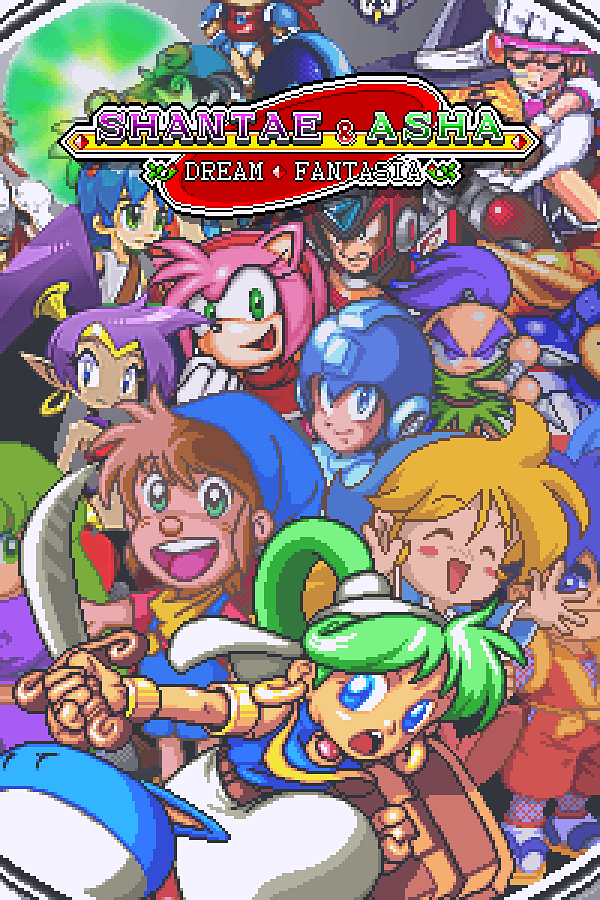
Shantae and Asha: Dream Fantasia is a Action-Adventure/Platformer 2D video game published by XBuster and developed by XBuster released on 2020 for Microsoft Windows.

Credits:​

Released by: XBuster
Type: Fan Game/Crossover
Engine: Monster World IV-2 (Game Maker Studio)
Status: Complete
Initial Release Date: 4 Feb 2020
Patch Version: v2.1.1
Patch Date: 4 Sep 2021

Source and details: https://gamejolt.com/games/Shantae_and_Asha_Dream_Fantasia/293793
RPG Maker.net Page: https://rpgmaker.net/games/10129/

Shantae and Asha: Dream Fantasia is an Open World 2D Platformer that blends action, RPG, puzzle, and adventure elements into one. It is a crossover featuring Asha from the 1994 Sega Genesis classic; Monster World IV and Shantae from the 2002 Game Boy Color classic; Shantae.

It is a brand new adventure that serves as Monster World IV-2, a Shantae crossover, and a crossover of other characters; most notably from the action-platform and RPG genres.

After the defeat of the Incarnation of Fear, peace has finally been restored to Monster World once again. One year has passed since then. However, a threat still lurks deep in the shadows. Asha's mother has fallen ill to a rare illness that can only be cured with seven magical ingredients. What starts out as a simple fetch quest to heal a loved one evolves into an adventure in which the very state of dreams is at stake.

Features:​

  • A challenging, fast-paced 2D action rpg with platform, adventure, and puzzle elements
  • A mix of new, old, and revamped areas
  • A full-fledged, dual arc story with over 100 cut scenes
  • A mostly open world that is scattered across separate, but interconnected zones
  • Enhanced Monster World IV battle system with new twists
  • Over 20 playable characters
  • Learn and equip the abilities of people you meet around the world
  • Over 40 areas full of things to discover and places to explore
  • Upgrade a vast variety of abilities via the completely open Synth Grid
  • Over 100 missions with unique objectives
  • Over 200 characters from various old-school and modern titles
  • Collect a variety of items scattered throughout the world
  • Acquire a wealth of game-changing equipment and abilities
  • Multiple side quests and events
  • Simulated gambling
  • Real-time daily effects
  • 30+ hours of content (possibly up to 50+ for completionists)
To play the game simply launch shantae-and-asha.exe. You can change the game to fullscreen by pressing F4.

Note: I had unusual issues of the game just not wanting to work for me at all. I was able to open it one time and then it just never worked again. I kept getting an error saying it stopped unexpectedly before it launches. I was able to fix it by pairing it up with dgVoodoo. You can delete dgVoodoo and related files if you want, (the exe, .conf, and d3d8.dll) but it's there to make this more stable in case my issue was not an isolated one.

Download Links​

 
Game gave me garbled graphics, I used this dll and it fixed the issue, just include it in the game folder, you can delete djvoodoocpl.exe
If dgVoodoo is giving you garbled graphics whenever it runs then maybe you need to update your base install of directx or your graphics drivers? Anyway I'll try the .dll you provided to replace it, and see how it works. The game uses D3DX8.dll and creates a copy of it every time it runs and saves it into a folder that starts with gm_ttt in C:/Users/User/AppData/Local/Temp. I tried copying it and directly placing it alongside the game exe but that didn't fix it either. If I try to run the game with nothing applied to it then it has an error saying something is wrong with my Windows system32 kernelbase.dll and says there was a read of address error at address 6F5C3890. Is anybody else having this issue too? This is the only Game Maker Studio game I have that has those errors, the others I have work fine.
edit: I tried your .dll and it didn't fix my issue. I can only get the game to run using dgVoodoo. I guess you can probably not use your .dll either. It's probably something on my laptop causing this issue. I might need to run DISM tools to fix my kernelbase dll. If someone else has the errors I described please let me know. It's bugging the hell out of me.
I remember finding this on another site a few years ago and I just didn't play it because there was no controller support. Has that changed?
The game has a controls setup option to remap controls but it doesn't accept any gamepad buttons as input options. In order to play with a controller use a button remapper like AntiMicroX. You can use it to configure a profile for this game based on the buttons from that 2nd screenshot. I know people don't like having to go get extra software, but I highly recommend that app. It's the best free button remapper and is even better than the paid options (reWASD and Xpadder). You can use it for making all PC stuff use a controller. If you're good at configuring it when making profiles you can end up never having to use a keyboard for PC gaming ever again. It's highly customizable and adjustable and can even fully cover mouse input too. With features like button combos and even adjusting for turbo buttons and how long a key is pressed.
 
Last edited:
Game gave me garbled graphics, I used this dll and it fixed the issue, just include it in the game folder, you can delete djvoodoocpl.exe
game wasn't booting at all for me until i had that dll.
haven't heard of "voodoo" graphics since win95.
 
I remember finding this on another site a few years ago and I just didn't play it because there was no controller support. Has that changed?
 
Game gave me garbled graphics, I used this dll and it fixed the issue, just include it in the game folder, you can delete djvoodoocpl.exe
Post automatically merged:

Asha my beloved
IMG_5817.jpeg
 

Attachments

Last edited:
I remember playing a Japanese version of Monster World 4 on my old genesis using a cartridge adapter that let you trick regions and got stuck on a puzzle with Animal statues.
Never finished that game.
 
This is what happens when you mix your medicine at 9 PM, what an interesting roaster.
 
You can turn off the (rather annoying and unnecessary) attack label popup that appears for every attack from an option for it in the menu. It honestly should have been off by default. Does anybody else feel like the speed of animations in this game is way too fast? I thought it was just me but when I looked at videos of it on YouTube it looked the same in theirs too. It must just be a side effect of it being made with Game Maker Studio
 

Users who are viewing this thread

  • Connect with us

    Support this Site

    RGT relies on you to stay afloat. Help covering the site costs and get some pretty Level 7 perks too.

    Featured Video

    Latest Threads

    Monster Hunter Poka Poka with english patch

    ¿Alguien me puede ayudar a encontrar Monster Hunter Poka Poka Airou Village con parche en...
    Read more

    Space Bash: Contact!! (MSX)

    Space Bash: Contact!! (MSX) by Dave's Retro Forge

    🚀If you love classic arcade platformers…...
    Read more

    Guess what?

    Online statistics

    Members online
    172
    Guests online
    1,376
    Total visitors
    1,548

    Forum statistics

    Threads
    20,133
    Messages
    509,105
    Members
    928,554
    Latest member
    Gamer16344

    Today's birthdays

    Advertisers

    Back
    Top