- Joined
- Jan 13, 2025
- Messages
- 187
- Level up in
- 63 posts
- Reaction score
- 594
- Points
- 2,227
- Location
- Scumm Bar
Hey!
I put together this script to tweak a few things on the repo. I kept adding stuff to it and figured some of you might find it useful too.
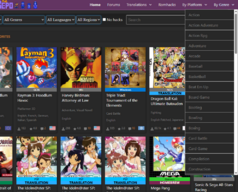
It makes some quality-of-life changes to the layout, improves the search bar, and adds some external integrations.
Screenshots attached below.
Here is what the script does:
Search & Navigation
General:
HowLongToBeat, RetroAchievements, Auto-download, and Auto-comments features are optional and can be enabled or disabled.
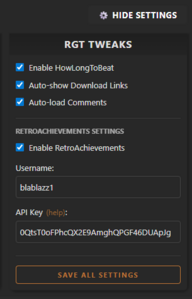
To configure the script, just click the site's existing "Show Settings" button. I've added the "RGT Tweaks" configurations directly into that menu, where you can toggle these features on or off and input your RA credentials.
How to Install
Step 1: You need a browser extension that runs userscripts. If you don't have one yet, I recommend installing Tampermonkey (great for Chrome, Edge, Safari) or Violentmonkey (great for Firefox).
Step 2: Once the extension is installed, Click here to install the script. A new tab will pop up. Just hit the "Install" button and you're good to go!
As far as I've tested, the script is mobile-friendly. You just need a mobile browser that supports extensions (such as Kiwi Browser or Firefox for Android). Install the Tampermonkey add-on and follow the same steps as on desktop.
How to set up RetroAchievements (RA)
To get your personal RetroAchievements data to show up on the game pages, you need to link your account:
1. Create a free account at RetroAchievements (if you haven't already).
2. Go to your profile settings, scroll down to the Authentication section and copy your Web API Key.
3. On the Repo, open the site's settings menu (via the "Show Settings" button), find the "RGT Tweaks" section, enable RA, and paste your Username and API Key. Click "Save" and you're good to go!
Important
Search Bar:
I had to do a bit of reverse engineering to piece together how the site handles searches from the outside. Because of this, there might be bugs, and I'm still tied to the limitations of the site's own search engine. If it acts weird, report it here, but there might not be much I can fix!
HowLongToBeat (HLTB):
The script searches using exact title, platform, and year. If a game exists on HLTB but doesn't show up here, report it so we can improve the logic.
Also, because HLTB does not have an official public API, the script pulls data directly from their search engine. They frequently change endpoints, so if the integration suddenly stops working (you will see an error "toast" notification), let me know and I'll update the script.
Let me know if you run into any bugs or if you have any cool ideas. If it's something doable, I'll try to add it to the script.
I put together this script to tweak a few things on the repo. I kept adding stuff to it and figured some of you might find it useful too.
It makes some quality-of-life changes to the layout, improves the search bar, and adds some external integrations.
Screenshots attached below.
Here is what the script does:
Search & Navigation
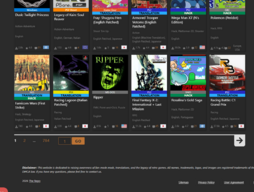
- New full search bar with multiple filters accessible on any page of the repo.
- Random game button that finds a random game based on your active filters.
- Browse games by genre right from the header.
- Link to the favorite games list on the top bar.
- Custom pagination with page numbers and a page number input to jump straight to a specific page.
- (Optional - Requires setup) RetroAchievements integration: If the game supports RetroAchievements, you'll see a custom card showing how many achievements you've unlocked, your total playtime, and a quick link to your profile.
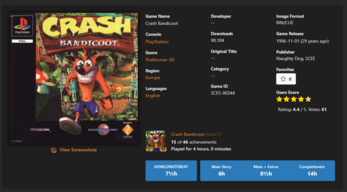
- (Optional) HowLongToBeat integration: Shows in the game page how many hours it takes to beat the game (Main Story, Extras, and 100% Completion).
- (Optional) Auto show download links.
- (Optional) Auto show comments.
General:
- Page content takes up a bit more space on the screen.
- Multi-line game titles look tighter.
- The site's font is forced into a clean, more modern one.
- Various tweaks to make the website take up a bit more space on your screen, and the text spacing is tighter so it's easier to read.
- New layout for game pages. Game covers are standardized in size, and game details are organized side-by-side (inspired by MobyGames).
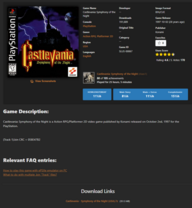
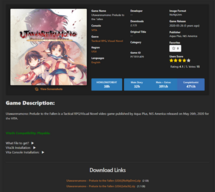
- Extra-long game descriptions are folded behind a "Show More" button to prevent endless scrolling.
- The bulky screenshot gallery is tucked away behind a sleek "View Screenshots" button to keep the page clean and fast.
- Download sections are redesigned into clean, easy-to-read lists.
HowLongToBeat, RetroAchievements, Auto-download, and Auto-comments features are optional and can be enabled or disabled.
To configure the script, just click the site's existing "Show Settings" button. I've added the "RGT Tweaks" configurations directly into that menu, where you can toggle these features on or off and input your RA credentials.
How to Install
Step 1: You need a browser extension that runs userscripts. If you don't have one yet, I recommend installing Tampermonkey (great for Chrome, Edge, Safari) or Violentmonkey (great for Firefox).
Step 2: Once the extension is installed, Click here to install the script. A new tab will pop up. Just hit the "Install" button and you're good to go!
As far as I've tested, the script is mobile-friendly. You just need a mobile browser that supports extensions (such as Kiwi Browser or Firefox for Android). Install the Tampermonkey add-on and follow the same steps as on desktop.
How to set up RetroAchievements (RA)
To get your personal RetroAchievements data to show up on the game pages, you need to link your account:
1. Create a free account at RetroAchievements (if you haven't already).
2. Go to your profile settings, scroll down to the Authentication section and copy your Web API Key.
3. On the Repo, open the site's settings menu (via the "Show Settings" button), find the "RGT Tweaks" section, enable RA, and paste your Username and API Key. Click "Save" and you're good to go!
Important
Search Bar:
I had to do a bit of reverse engineering to piece together how the site handles searches from the outside. Because of this, there might be bugs, and I'm still tied to the limitations of the site's own search engine. If it acts weird, report it here, but there might not be much I can fix!
HowLongToBeat (HLTB):
The script searches using exact title, platform, and year. If a game exists on HLTB but doesn't show up here, report it so we can improve the logic.
Also, because HLTB does not have an official public API, the script pulls data directly from their search engine. They frequently change endpoints, so if the integration suddenly stops working (you will see an error "toast" notification), let me know and I'll update the script.
Let me know if you run into any bugs or if you have any cool ideas. If it's something doable, I'll try to add it to the script.
Attachments
-
 Screenshot 2026-05-13 020319.png1.3 MB · Views: 41
 -
 Screenshot 2026-05-13 015212.png315.4 KB · Views: 33
 -
 Screenshot 2026-05-13 015000.png352.3 KB · Views: 28
 -
 Screenshot 2026-05-13 014810.png270.9 KB · Views: 31
 -
 Screenshot 2026-05-13 014633.png389.9 KB · Views: 29
 -
 Screenshot 2026-05-13 001332.png675.3 KB · Views: 29
 -
 Screenshot 2026-05-13 031249.png538.4 KB · Views: 27
 -
 Screenshot 2026-05-13 031116.png18.4 KB · Views: 29
Last edited: