

LaunchBox + RPCS3 = Vulkan Error

5thWolf

5thWolf's icon
Paladin Knight
Supporter
Level 1
81%
Joined
Dec 5, 2024
Messages
86
Level up in
14 posts
Reaction score
179
Points
1,377
Location
USA
Ok so RPCS3 works perfectly for me when I run game through it. No Vulkan issues at all.
However, if I launch a game through LaunchBox it gives me this error:
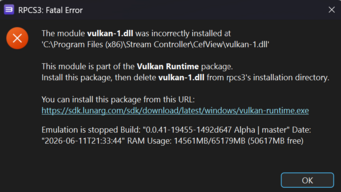
Screenshot 2026-06-11 213358.png
This only happens with LB. I did try the suggested install that it gives, but it changes nothing. Also, there is no vulkan.dll in the root folder for RPCS3 so that not the issue.
nVidia drivers have been updated many times with new updates. Including clean installs. No diffrence.
Post automatically merged:

Also, why does it refer to steam controller on the first line?
 
Last edited:

That might be a virus interfering as I have a steam controller and lunchbox as well as RPCS3 and can launch it without any issue
 
Gotta be honest, I tried launchbox and I think it is just adding unnecessary steps. Profit from this event and ditch it.
 
2. Uninstall Windows Compatibility Pack
If your PC has integrated and dedicated graphics (like AMD Ryzen processors) and uses Vulkan, a specific Windows add-on is known to break emulators.
  • Open Windows Settings > Apps > Installed Apps.
  • Search for OpenCL™, OpenGL®, and Vulkan® Compatibility Pack.
  • Uninstall this app, as it notoriously causes Vulkan to crash when launching emulators through frontends like LaunchBox.
 
2. Uninstall Windows Compatibility Pack
If your PC has integrated and dedicated graphics (like AMD Ryzen processors) and uses Vulkan, a specific Windows add-on is known to break emulators.
  • Open Windows Settings > Apps > Installed Apps.
  • Search for OpenCL™, OpenGL®, and Vulkan® Compatibility Pack.
  • Uninstall this app, as it notoriously causes Vulkan to crash when launching emulators through frontends like LaunchBox.
I don't have any of those installed. Also, it specifically seems to mention Steam Controller, which I have no idea why. I never have or nor ever will launch rpsc3 through Steam. I did make sure the controller settings in Steam is all disabled but not changed.
Also I have tons of emulators like PCSX2 and so on and RPCS3 is the only one having this issue with Launchbox.
 

Users who are viewing this thread

Connect with us

- -

Support this Site

RGT relies on you to stay afloat. Help covering the site costs and get some pretty Level 7 perks too.

Featured Video

Latest Threads

Which physical retro game in your collection are you most proud of owning? And why?

I’m curious to know which piece in your collection makes you go "wow!", and why ::thinking

I'll...
Read more

I am confused...

Why is there a 0 (ZERO) on the microwave? Who is going to heat up food at 0 seconds?...
Read more

What's the hardest retro game you've ever completed?

What's the hardest retro game you've ever legitimately completed (AKA no save states, rewind...
Read more

Somebody Opened Up An Intellivision Amico

A couple weeks ago, Kevtris over on the Atari Age Forums, who is also one of Analogue's hardware...
Read more

Who Deserves a Spot

Screenshot_20260612-111748~2.jpg


Honestly I was thinking Master Chief but idk.... How bout you? 👀
Read more

Online statistics

Members online
155
Guests online
1,526
Total visitors
1,681

Forum statistics

Threads
20,093
Messages
508,411
Members
928,364
Latest member
Giatmmhhn

Today's birthdays

Advertisers

Back
Top