best ps2 isos compression

Dartz

Young Hero
Level 1
31%
Joined
Dec 2, 2024
Messages
48
Level up in
52 posts
Reaction score
33
Points
127
Location
Italy
anyone know which method is better for save more space , pcsx2 can read isos both in chd format and in gzip archive , most i used the gzip method but planning to switch to chd if can save more space with this , thanks
 
CHD will definitely save more space since it uses a mixture of LZMA for data tracks and FLAC for audio tracks.

Gzip uses DEFLATE compression, which generally saves less space than LZMA for general data, and neither DEFLATE nor LZMA performs as well as FLAC for audio.

There is a case to be made for gzip as well: LZMA takes more CPU power to decompress. If your computer doesn't have a powerful enough CPU to emulate PS2 games in real time, you might notice more frame drops with LZMA.
 
CHD will definitely save more space since it uses a mixture of LZMA for data tracks and FLAC for audio tracks.

Gzip uses DEFLATE compression, which generally saves less space than LZMA for general data, and neither DEFLATE nor LZMA performs as well as FLAC for audio.

There is a case to be made for gzip as well: LZMA takes more CPU power to decompress. If your computer doesn't have a powerful enough CPU to emulate PS2 games in real time, you might notice more frame drops with LZMA.
hey... is gzip more useful than chd?
 
hey... is gzip more useful than chd?
If your goal is to save as much space as possible on your game ISO collection while still keeping it in a format readily usable by many emulators, then no. CHD is probably your best option short of directly modifying the game to remove assets or replace them with smaller, lower-quality versions.

If your goal is to compress some other data or you only need to save a little space and need it to use less CPU overhead, gzip might be a better choice. It all depends on what you are using it for.
 
looking at my personal collection, now is 70/80% .chd and 20/30% .gzip
so gzip to me could still be useful in some cases

i like to keep compressed only the iso that have a substantial gain in size
 
my ps2 collection was getting 1.50 tb of space in gzip , imho too much , thats why thinking about switch to chd , hopefully my pc can handle everything despite the heat problem and since i'm using the drive also for other romstes better i try to save as much space as possible
 
yes talking in TB you will surely gain more space, some isos will benefit a little, some gzip will remain better, the most i think on average 4/500 MB gain each and some even more

you have a good bunch of work :)

no heat problems here when compressing to chd and during emulation, on a i5 laptop

perhaps you can share your results at the end, as your collection is surely bigger than mine (around 500 GB here)
 
Last edited:
i noticed the ps2 chd script for the compression not work if the ps2 game is in bin/cue format only work if is an iso , not sure if for these have to use the psx script istead , hopefully can found these in chd already somewhere , will be a long task , would have been nice knew before that chd saves more space also if not sure old pcsx2 could read them , somewhere i've read old versions not compatible to chd and only to gzip but maybe remembering wrong
 
Why not just buy a bigger drive and use the ISO format that works with nearly every emulator?
Well every emulator I know of honestly, with PS2 I don't know of one that doesn't read ISO.

But again, I use a pair for 2TB drive's for my stuff, so swings and roundabouts
shrug2.gif
 
is already a 18 tb one the one i use , i'm using it for other romset too so i'm trying saving space for everything
 
i noticed the ps2 chd script for the compression not work if the ps2 game is in bin/cue format only work if is an iso , not sure if for these have to use the psx script istead , hopefully can found these in chd already somewhere , will be a long task , would have been nice knew before that chd saves more space also if not sure old pcsx2 could read them , somewhere i've read old versions not compatible to chd and only to gzip but maybe remembering wrong
I'm not sure which script you're using, but chd does support PS2 bin/cue files. Most PS2 games were on DVDs (.iso) but a handful still released on smaller CDs, which are the bin/cue you're seeing. They have to be compressed using different options. For the command line version, it's createcd rather than createdvd, but if you're using a script someone else made, it may or may not include that option.
 
I'm not sure which script you're using, but chd does support PS2 bin/cue files. Most PS2 games were on DVDs (.iso) but a handful still released on smaller CDs, which are the bin/cue you're seeing. They have to be compressed using different options. For the command line version, it's createcd rather than createdvd, but if you're using a script someone else made, it may or may not include that option.
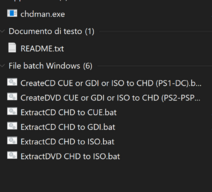
im using chdman , it had the batch scripts and wasn't sure about which one use for bin cue the one labeled for ps2 didn't worked
 

Attachments

  • Cattura.PNG
    Cattura.PNG
    34.7 KB · Views: 12
im using chdman , it had the batch scripts and wasn't sure about which one use for bin cue the one labeled for ps2 didn't worked
It should be that first one. It says PS1, but there are a handful of PS2 games it applies to as well, anything bin/cue
 
PS2 ISO DVD are .iso PS2 ISO CD are .bin/cue (few games are released in cd for ps2, GARO, Gundam Seed are few examples) convert iso to bin work in emulator if run from the iso if you burn yo a disc not.
 
Why not just buy a bigger drive and use the ISO format that works with nearly every emulator?
Well every emulator I know of honestly, with PS2 I don't know of one that doesn't read ISO.

But again, I use a pair for 2TB drive's for my stuff, so swings and roundabouts
View attachment 114880
uhhhh you really got to beware of the lifespan of m.2 ssd(s) and whatever kind of storage discs you may have after all... something might happen out of nowhere and you just lose all your stuff so buy 800gb or less
Typing Coding GIF by Sugartown
 
uhhhh you really got to beware of the lifespan of m.2 ssd(s) and whatever kind of storage discs you may have after all... something might happen out of nowhere and you just lose all your stuff so buy 800gb or less
Typing Coding GIF by Sugartown
I know that.

I don't trust any one form of storage. I have three sets of backups at any given time.
The ones in use, which as you said are M.2, and then I have them backed up on regular SATA SSDs, and finally on spinning rust (mechanical HDDs).

There's very little chance all of them will go all at once. I also have a PC that never gets on the net, which is a giant storage system, so I'm pretty good about intentional redundancy.

But hey, shit she do happen
Adverage IT010.gif
 
at the end after compressed to chd still not saved that much sadly , probably would need a new drive soon , ps2 is expensive , impossible going under tb
 

Users who are viewing this thread

Connect with us

Support this Site

RGT relies on you to stay afloat. Help covering the site costs and get some pretty Level 7 perks too.

Featured Video

Latest Threads

Pokemon Crystal Awakening

Pokemon-Crystal-Awakening.png

I found this hack for Pokemon Crystal, it looks really cool, so Zelda style...
Read more

Animal Crossing: City Folk Deluxe [Wii]

Released about a year ago by Aurum, this is a riivolution patch that adds more villagers, new...
Read more

Post your favorite characters, but,,,

Welcome to this totally Harmless thread, simply put, psot six of your favorite characters, can...
Read more

Final Fantasy VI hackrom suggestion

Hello, I am currently searching in CDRomance for a hackrom of the game that is:
  • ...
Read more

I don't think I'm going to start playing RPGs either; I don't know if it's worth it.

Ele faz.I've wanted to get into the world of Japanese RPGs, any kind of RPG, for a long time. I...
Read more

Online statistics

Members online
87
Guests online
403
Total visitors
490

Forum statistics

Threads
15,370
Messages
371,824
Members
896,568
Latest member
xXMonkeyrobotXx

Today's birthdays

Advertisers

Back
Top