Windows Amiga OS 3.1 Preconfigured Workbench + Over 150 Games (WinUAE)

CSmith327

Final Form
Repo Curator
Level 5
1%
Joined
Dec 1, 2024
Messages
1,014
Level up in
1486 posts
Reaction score
1,749
Points
4,477
Location
North Carolina, USA
Amiga-ClassicWB.webp

Download Links​

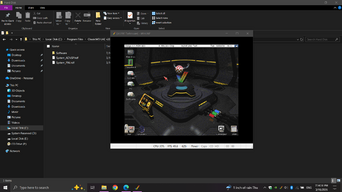
This is a little experiment of mine to see about maybe getting Amiga on the Repo. This is a full preconfigured install of Workbench along with the WHDLoad based game launcher iGame with over 150 games. Here's a guide on how to get this working like in the screenshots:
  1. Extract the archive to wherever you want (Program Files may be best since the emulator is already set up for being in that folder)
  2. Launch winuae64.exe (in admin is best) and in the Paths settings set them to where those places are now on your PC
  3. Click to Rescan ROMs
  4. In Configurations load the A4000 Turbo preset and then before starting make sure you have the sound, display, and filter settings how you like
  5. Configure your keyboard and other input options in the Input and Game ports settings (they can be a little tricky so experiment with them)
  6. Double click the A4000 Turbo preset in Configurations to start or just click start after you're sure the preset has been loaded. You can open WinUAE again by pressing F12
  7. When it starts you should be at the desktop with no programs open. You can have fun and experiment with the desktop environment and pre-installed applications (there's a lot) if you like
  8. To play a game open the iGame launcher by revealing the shortcut for it at the top by right clicking and then just pick a game and press enter or click on it a few times
  9. Most all games will glitch out unless Cycle-exact (Full) is checked in the Chipset settings so be sure to check that once a game has started playing
  10. To exit a game the button is usually F10 but some games are set to the * key
  11. Be sure to look at the screenshots and read the captions for them as I've included important info in some of them
Games in WHDLoad format and games in all kinds of formats for Amiga and Amiga CD32, CDTV, and CD-ROM games can be found at the Turran FTP server Most of the games I got for this post are found from within these folders (download them, extract the lha archive, and move the files to the folders read by iGame like in the screenshots) The games included are all the ones that appealed to me when looking through the huge library of games on Turran (one interesting one is Black Dawn Rebirth, it's a newer indie one)

Software for Amiga can be found at aminet but be mindful of the software requirements and dependencies.

I'll see if I can get Spike or whoever to add a PC section for Amiga so that I can add Amiga CD-ROM titles like Genetic Species, Payback, OnEscapee, and Wasted Dreams (to name a few) also CD32 games too.

This post is not for the faint of heart or the impatient, but I encourage anyone curious in the Amiga system to check this out and have fun with it. You should be sure to do a lot of research on both using WinUAE and stuff about Amiga. It took me around a month to set this up for myself as a personal project and now I'm sharing it with you guys. I'll probably go back and tweak this post to add or review relevant info but I'm happy with it at the moment.

 
This is awesome, i just can't seem to make igame recognize the games i added... Oh well atleast there is alot of other stuff to play lol.
You can manually add games to it easier than refreshing them since it keeps wanting to undo all the manual naming and genre labeling I did if you refresh it.
There's a torrent on rutracker.org that is the exact same version of AmigaOS that I used for this but with like 4,000 games. You can find it here and the torrent file is attached to this comment. It's probably easier to use than mine. I recommend using qBittorrent to download it.
 

Attachments

Last edited:
This is awesome, i just can't seem to make igame recognize the games i added... Oh well atleast there is alot of other stuff to play lol.
 
PiMIGA 5.0 by Chris Edwards

It’s free, it’s awesome and it’s easy to handle. All download links are in his latest video description. This build stands on his own feet… maybe it’s a solution for one or more AMIGA enthusiasts, fearing the Linux penguin.

Luckily the BIOS files are already available for download. They are part of the Castlevania AGA post.
 
Last edited:
So would I have to do anything special if I were to try to set this up on a PS3 via OtherOS/Linux? And which Linux distro would you recommend using?
I tried asking this question over @ PSX-place recently, and never got an answer..
If you can figure out how to get FS-UAE running on your PS3 then that would be ideal. I'm not an expert on Linux distros and the only one I've ever really used much of is Ubuntu on an older laptop I had. You can set the files up for FS-UAE if you use the same kinda way the configurations in this are doing but with that app instead. Using the same cpu/ram/chipset values and using the same hard drive files and folders. Then you can save the configuration for FS-UAE and load it through the launcher just fine. I might make a guide about how to do that later if the Amiga sections of the forums are working right (trying to get to the other repo posts of Amiga games by clicking on the word Amiga in an Amiga post goes to a 404 error page so it seems the section still needs some fixing up) I'm honestly feeling kinda burnt out right now and maybe need to take a break for a few days. ::sailor-embarrassed
 
So would I have to do anything special if I were to try to set this up on a PS3 via OtherOS/Linux? And which Linux distro would you recommend using?
I tried asking this question over @ PSX-place recently, and never got an answer..
 
I fixed and tidied up the Configurations in this since I had been neglecting all the ones except A4000 since that was the one I used mostly. Now it should run smoother and not say anything is missing. The A1200 Configurations used the ADVSP ClassicWB version and I didn't have that hard disk file and that caused it to fail if you tried to use those configurations. Here's what the ADVSP Workbench looks like through the A1200 model (in the attached image)

Also like I mentioned in the note I added, you can use this post fine with FS-UAE in Linux if you set everything up properly using the same hard drive stuffs

edit: ahh crap, ignore and remove the entry for Agony in iGame if you see it. That game doesn't work properly through WinUAE for some reason. It had weird gameplay glitches if you use the floppy disk and the WHDLoad didn't work at all. It worked fine in FS-UAE. I removed the files for Agony from the game folders but the entry for it in iGame might still be there. Unless it refreshes it and goes away automatically
 

Attachments

  • A1200.png
    A1200.png
    230.2 KB · Views: 29
This is something I needed ! I will be able to use AHX Tracker without all the hassle (not used to Amiga, I am usually a ST guy) !
Thanks !!!
 
Something important to mention:

Amiga has two extremely thorough databases for game information. Hall of Light and Lemon Amiga. They both have very deeply in-depth info about each Amiga title. Including tons of screenshots, scans of boxes, pdfs of manuals and other game documents in various languages, cheat and faq/walkthrough information, all the publisher information, official magazine review articles, reviews from site users, etc. Just literally everything you would need to know. Even install help on a lot of them that have particular requirements and installation procedures.
 
Thank you very much !
Amiga gaming is a totally different beast compared consoles and PC gaming.
While many games were questionable or even ratger roughly designed (even some really bad ones too ) has still its great gems which are classic bangers and potential inspirations for future games to design .

Especially the RPGs are something that should be looked up for . Ohh ! And the Soundtracks of many games ( from bad or good games ) are absolute bangers that are very atmospheric , very catchy or just legendary stuff .

This thing just rocks with experimental attitude and style !!
 
Has it been updated or is it the same v28.7 from a month ago?
The only thing that needed to be updated was the version of WinUAE in it from 6.0.2 to 6.0.3. Bloodwych hasn't worked on ClassicWB in several years and the version I have here is the last one they ever did. It's pretty much as perfect as it can get I guess
 
Has it been updated or is it the same v28.7 from a month ago?
 
As someone who LOVES the Amiga, thank you so much for this!

I hope Amberstar made it to the list!

I know what I'm doing tonight ::biggrin
 
WinUAE version was updated to latest (v6.0.3). There's a new section for Amiga games, but I think I should leave this one in Windows section instead of creating a new post for it. All the comments would be deleted if I did. Also new audio output driver added (PortAudio) click the checkbox for it in the Sound options for the output option for it to show in the dropdown of them
 
Can we install this on VirtualBox?
I don't see why not, it's not even "installing" it's just moving folders and files around. It should work fine if you use it with a VirtualBox setup. Just make sure that the system requirements for WinUAE are installed in your VirtualBox instance. I don't know what they are from memory tho. Maybe Google search what it needs if there's any special redistributable requirements like Visual C++ or DirectX or dotnet
 
Now you're starting to reignite my desire to buy a PowerPC and set up Amiga OS 4 or MorphOS with this talk of possibly an Amiga section of the repo :P
 
There are so many great games coming out on Amiga these days, it's crazy. Some examples are Rogue Declan, Roguecraft and the newly released DX version, Reshoot Proxima 3, Cecconoid (The Amiga version has awesome music). It's worth keeping an eye out for new releases on itch, a lot of good free stuff comes out there. Also the Indie Retro News site covers a lot of in-dev work and new releases and updates
Woah, I'll have to check some of those out. I've seen some Amiga games on itch.io before but a lot of them were like $9.99 or so and not free. There's a couple games from itch in this post but I forgot the names of them
 
Amiga-ClassicWB.webp

Download Links​

This is a little experiment of mine to see about maybe getting Amiga on the Repo. This is a full preconfigured install of Workbench along with the WHDLoad based game launcher iGame with over 150 games. Here's a guide on how to get this working like in the screenshots:
  1. Extract the archive to wherever you want (Program Files may be best since the emulator is already set up for being in that folder)
  2. Launch winuae64.exe (in admin is best) and in the Paths settings set them to where those places are now on your PC
  3. Click to Rescan ROMs
  4. In Configurations load the A4000 Turbo preset and then before starting make sure you have the sound, display, and filter settings how you like
  5. Configure your keyboard and other input options in the Input and Game ports settings (they can be a little tricky so experiment with them)
  6. Double click the A4000 Turbo preset in Configurations to start or just click start after you're sure the preset has been loaded. You can open WinUAE again by pressing F12
  7. When it starts you should be at the desktop with no programs open. You can have fun and experiment with the desktop environment and pre-installed applications (there's a lot) if you like
  8. To play a game open the iGame launcher by revealing the shortcut for it at the top by right clicking and then just pick a game and press enter or click on it a few times
  9. Most all games will glitch out unless Cycle-exact (Full) is checked in the Chipset settings so be sure to check that once a game has started playing
  10. To exit a game the button is usually F10 but some games are set to the * key
  11. Be sure to look at the screenshots and read the captions for them as I've included important info in some of them
Games in WHDLoad format and games in all kinds of formats for Amiga and Amiga CD32, CDTV, and CD-ROM games can be found at the Turran FTP server Most of the games I got for this post are found from within these folders (download them, extract the lha archive, and move the files to the folders read by iGame like in the screenshots) The games included are all the ones that appealed to me when looking through the huge library of games on Turran (one interesting one is Black Dawn Rebirth, it's a newer indie one)

Software for Amiga can be found at aminet but be mindful of the software requirements and dependencies.

I'll see if I can get Spike or whoever to add a PC section for Amiga so that I can add Amiga CD-ROM titles like Genetic Species, Payback, OnEscapee, and Wasted Dreams (to name a few) also CD32 games too.

This post is not for the faint of heart or the impatient, but I encourage anyone curious in the Amiga system to check this out and have fun with it. You should be sure to do a lot of research on both using WinUAE and stuff about Amiga. It took me around a month to set this up for myself as a personal project and now I'm sharing it with you guys. I'll probably go back and tweak this post to add or review relevant info but I'm happy with it at the moment.
There are so many great games coming out on Amiga these days, it's crazy. Some examples are Rogue Declan, Roguecraft and the newly released DX version, Reshoot Proxima 3, Cecconoid (The Amiga version has awesome music). It's worth keeping an eye out for new releases on itch, a lot of good free stuff comes out there. Also the Indie Retro News site covers a lot of in-dev work and new releases and updates
 
They don't appear because each folder has to have a corresponding .info file and they don't. You can see them if you use Directory Opus (DOPUS) But anyway you're not supposed to load them from that. You can load them from the iGame launcher. It'll show a list of all the games I have files for along with screenshots on some of them. (but not all since I had to manually create and edit each screenshot and then convert them to the image format iGame uses and I got lazy instead of giving all of them screenshots)

Ah, that makes sense.

I'll give this more of a look. I'd like to try and get the Command & Conquer port from itch working on it.
 
Last edited:
Heck yeah, now we're talking!
 

Users who are viewing this thread

Connect with us

Support this Site

RGT relies on you to stay afloat. Help covering the site costs and get some pretty Level 7 perks too.

Featured Video

Latest Threads

SEGA decides to get busy...

So, everyone's already been talking about the Crazy Taxi...
Read more

Games similar to Valkyrie Profile 2: Silmeria?

I'm having a blast with this game. I'm not even halfway through it yet, but I know for a fact...
Read more

Cartoon Trope you are surprised it is canon to reality?

Cartoons, part of their fun is seeing impossible stuff happen onscreen, but sometimes, something...
Read more

Your brawler/beat'em up/hack n slash mains

Needed to make a counterpart to the fighter mains. Don't matter if it's a 2D, 2.5D, or 3D...
Read more

Goblins

Twice is a coincidence, three's a pattern, and I've noticed an uptick in goblin employment over...
Read more

Online statistics

Members online
96
Guests online
2,759
Total visitors
2,855

Forum statistics

Threads
19,776
Messages
501,070
Members
926,791
Latest member
magicthethiccening

Today's birthdays

Advertisers

Back
Top