PC-98 Star Cruiser II: The Odysseus Project (English Patched) NEC PC-98

CSmith327

Final Form
Repo Curator
Level 5
6%
Joined
Dec 1, 2024
Messages
1,084
Level up in
1416 posts
Reaction score
1,853
Points
4,477
Location
North Carolina, USA
star-cruiser-II-cover.webp

Game Description:​

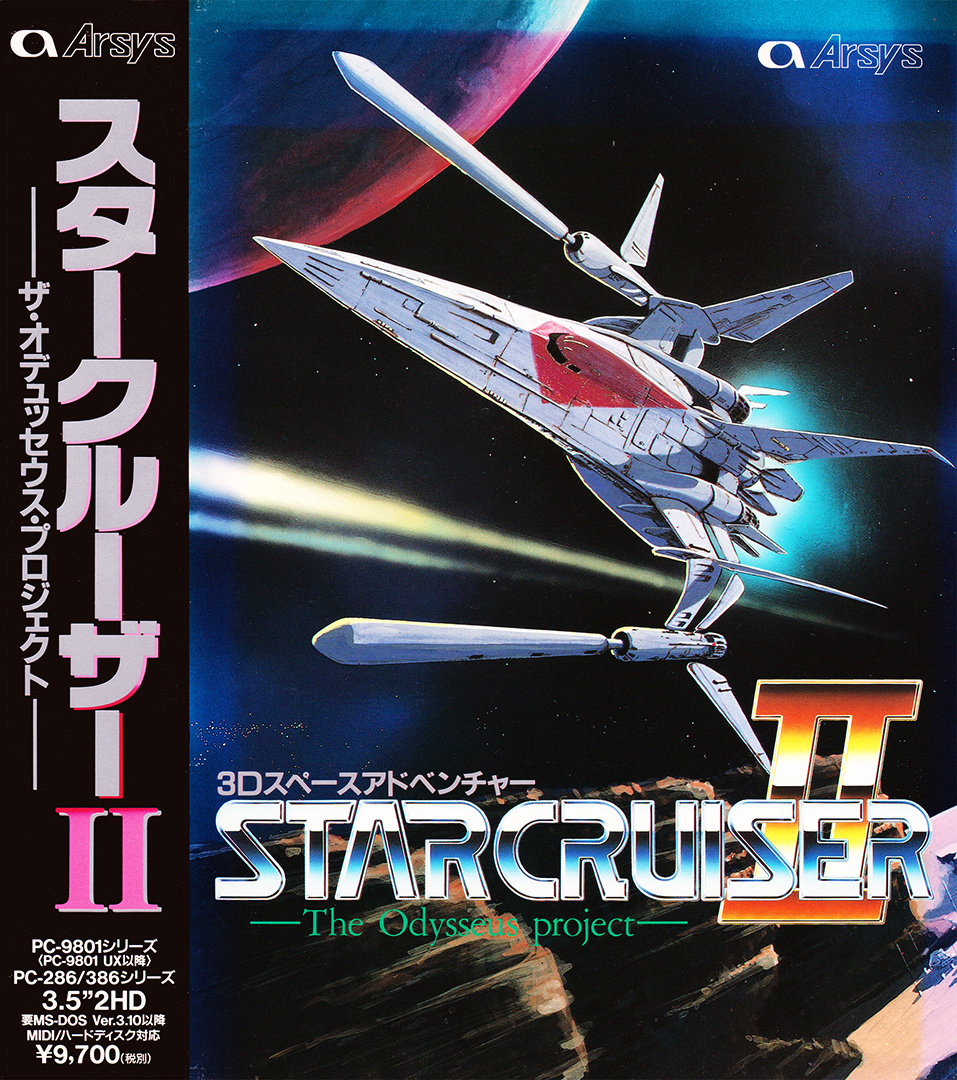
Star Cruiser II: The Odysseus Project (スタークルーザーII) is an RPG/Shooter/Space Combat video game published by Arsys Software and developed by Arsys Software released on June 18th, 1993 for the PC-98.

This game is a PC-98/FM Towns only sequel to Star Cruiser, which came out on numerous systems (SMD, PC-88, PC-98, x68000). It has a few changes in game mechanics, it is more story-heavy and perhaps a bit more fast-paced than the first game. The single most prominent change is being able to use the mouse and the keyboard to play. This is also possibly the best way to play the game, since it contains shops and adventure-like sections where you need to investigate certain areas.

In terms of plot, this game is a direct continuation of the first game. 5 years have passed since the events of Star Cruiser 1. Brian, the protagonist of both games, arrives back to Ganymede, after a long space journey. Upon the arrival, he learns of the new exploration project mankind came up with. What is it exactly? The players will have to find out on their own…

Translation Credits:​

Released by: Nebulous Translations
Language: English
Status: Fully Translated
Patch Version: v1.0
Date: 08 Oct 2017

Source and details: https://nebulous.group/index.php/projects/translations/star-cruiser-2/

The MS-DOS 6.2 disk 1 that is mentioned in the readme can be downloaded on their site: https://nebulous.group/index.php/tools/

I highly recommend the emulator Neko Project 21/W for playing on Windows. It's the most feature complete emulator for the NEC PC-9801 and is in active development receiving frequent updates. Use this guide for help on how to obtain and configure the emulator.

It can play in Neko Project II Kai core in RetroArch, but there's no music. Just make sure you have all the PC-98 bios files in the System folder. (C:\RetroArch-Win64\system if using default install location on Windows) I shared them in this comment.

This game uses MIDI for music instead of the PC-98's FM synth. In order to control the MIDI output if using NP21/W you'll need an MIDI Mapper such as CoolSoft's VirtualMIDISynth and MIDIMapper (they work in tandem with one another) and in NP21/W go to Device -> MIDI options... and in the MIDI-OUT dropdown pick CoolSoft MIDIMapper. Some great soundfonts you can use with VirtualMIDISynth can be found in this folder I shared of my collection on MEGA. (Arachno is my favorite)

The Neko Project II Kai core doesn't seem to have any options to manage and control MIDI output and soundfonts. So the music doesn't seem to play in it. Maybe you guys can find a way to get it to work, but I'm not seeing anything for it.

You can find a PDF scan of the game manual here but it's in Japanese.

Download Links​

 
Last edited:
It's also on PC-98 but only the Sega Genesis version of the first game has been translated. All the other ports of it are Japanese only. The same group translated it too. It's the reason they worked on this one too. You can find it on the repo if you search for star cruiser
I have already the SG version, bro, haha! xd/ But I am curious about how this game was made for PC-98, hee, '^^?
 
Thx a star, bro, :d¡ But, the first part for PC-98, papuh? :v?
It's also on PC-98 but only the Sega Genesis version of the first game has been translated. All the other ports of it are Japanese only. The same group translated it too. It's the reason they worked on this one too. You can find it on the repo if you search for star cruiser
 
Thx a star, bro, :d¡ But, the first part for PC-98, papuh? :v?
 
Do you know what other options can be put for driver and output? Like if I wanted to use the soundfonts I have through a mapper like the one I mentioned in the description or one like Fluidsynth.
Afraid not, unfortunately. I do believe it is possible to configure RA to use something external like Fluidsynth to play MIDI but I have no experience with it so I don't know how exactly.
 
helpful stuff
I actually had MIDI set up in RA for cores that use it (like DOSBox), but there wasn't anything for MIDI at all in the core options of NP2Kai through the menu. It's kinda dumb that you have to append lines to the cfg file directly for it to use it. Anything that can be done to the cfg file should have a corresponding toggle/setting for it in the core options, but they left those out for whatever reason. Thanks for the helpful info on how to get it working. Do you know what other options can be put for driver and output? Like if I wanted to use the soundfonts I have through a mapper like the one I mentioned in the description or one like Fluidsynth.
 
I can get MIDI music playing with the Neko Project II Kai core in RetroArch. You have to make sure MIDI playback is enabled in RA though, otherwise it won't output anything even though the core supports it just fine.

What worked for me:

First, boot the game, then go to the RA menu and create a cfg file for the game (should be named something like "Star Cruiser II [T-En by Nebulous Translations v1.0].cfg"). Quit the game then edit the cfg file and add those lines:

midi_driver = "winmm"
midi_input = "OFF"
midi_output = "MT-32 Synth Emulator"
midi_volume = "40"

For volume put whatever you want but keep in mind volume control don't seem to work for MIDI music as it normally does. So you need to set it beforehand.

Alternatively just add those to the core's cfg (Neko Project II kai.cfg). Or you can just edit the retroarch global cfg (retroarch.cfg) to have those value but I prefer to do it on a per core/game basis.

When the game begins select the default LA Sound Source MT-32 MIDI option. You should hear music when you see the spinning logo if it worked.
 
Beware: There have been no replies in this thread for 90 days.
Keep that in mind when expecting a reply from the people on it,
You can also start a new thread instead. This is just a heads-up, bumping is allowed in this forum.

Users who are viewing this thread

Connect with us

Support this Site

RGT relies on you to stay afloat. Help covering the site costs and get some pretty Level 7 perks too.

Featured Video

Latest Threads

TV Shows That Get Better as They Go

It seems that a lot of shows peak in season 1, or at least progressively get worse the longer...
Read more

What are your thoughts on DeviantArt?

Even though I'm no artist myself (and I'm talking stick-figure level here), I made a DeviantArt...
Read more

Xbox 360 Game recommendations

So me & my sister's boyfriend found an old Xbox 360 over at his house with two controllers...
Read more

9 steam games you want to spread

Cool site I came across: 9games.pages.dev
Read more

Online statistics

Members online
116
Guests online
2,576
Total visitors
2,692

Forum statistics

Threads
20,284
Messages
512,544
Members
929,415
Latest member
Danga

Today's birthdays

Advertisers

Back
Top