Wii Pokémon Mystery Dungeon: Adventure Squad (English Patched)

tonyhoro

Final Form
Writers Guild
Repo Curator
Level 3
90%
Joined
Dec 5, 2024
Messages
475
Level up in
25 posts
Reaction score
912
Points
2,577
Location
Rio
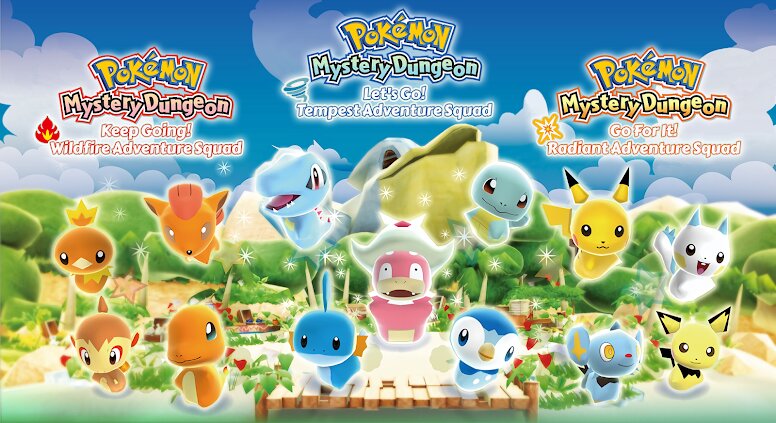
PMD_WiiWare_Translation_Promo_Image.png.341d9188c6f687ecab61f37a1d583f23.jpg


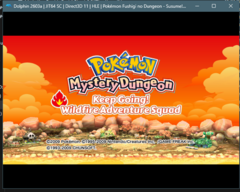
These are translated versions of three Wiiware-exclusive Pokémon Mystery Dungeon titles: Pokemon Fushigi no Dungeon - Ikuzo! Arashi no Boukendan Pokemon Fushigi no Dungeon - Mezase! Hikari no Boukendan Pokemon Fushigi no Dungeon - Susume! Honou no Boukendan Not only the games were fully translated, but they also had some content restored. For more information about this, please read the README file. Credits: SpecialAgentApe: Hacking, Gameplay Text Porting, Splash Screen Artwork, Localization Higsby: Story Translation Lonechallenger: Minor Translation Megaminerd: Hacking kkzero: Hacking wowjinxy: Splash Screen Hacking Anonymous (Linoone): Font ShinxHijinx: Testing/Gummi artwork Rocket: Testing Aaron: Testing MandL27: Testing Lady […]

Download Links​

 
im very glad the repo opened up wii for this reason, i had previously patched this myself but how convenient for the future/ providing for friends
 
Also I want to leave a special thanks to the Romsfun owner who has an account here on RGT and keeps reuploading the games there! If you have any skill issue regarding how to apply translation patches, feel free to ask any admin, we'll gladly help you out by teaching you the basics =)
 
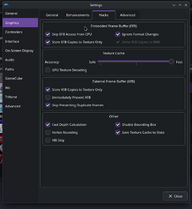
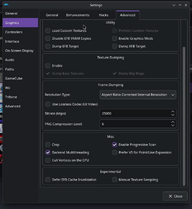
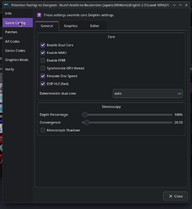
For anyone experiencing black/purple screen issues on android, ensure Pal 60 Mode is unchecked (config/Wii settings) and Store XFB Copies to Texture Only is unchecked (Graphics/Hacks).
BROOO Finally the damn game is open, thanks Bro, I thought it was impossible 👍👍
 
I like how Swinub in its low-poly form that they made for certain Wii games looks literally identical to its normal design. It kinda makes me wonder if there's anything else like that.
 
wow i thought pokemon games were slow, this is the SLOWEST pokemon game i've played yet!
i checked all options, it's all on FAST (LOL if they think this is FAST)
it's only in dungeons i'm running SO fast around the base (why isn't the dungeon gameplay this FAST!?)
like, messages of "you did tackle! 10 damage!" take SO long to scroll, longer than any pokemon game i've played (even GB pokemon games)
i already see holding B skips text as soon as possible but it still a huge delay...
i know holding B also makes you move really fast on hallways also, i used this on all mystery dungeon games i've played.
the Wii chocobo's dungeon also goes MUCH faster. same mystery dungeon stuff same console, but not SLOW...
i didn't think legends ZA was slow at all, to compare what a "fast" pokemon game is like.
but yeah, always happy to fast forward in pokemon games more than any other games
Post automatically merged:

The BPS file is the Pokémon Rumble Weekend Rom, which I was too lazy to rename. I'll try what you all suggested in a little while, and if that doesn't work, I'll try the stable version of Dolphin or something else... Oh, by the way, the Pokémon Rumble one looks just like yours with its cover, but the other three don't.
i didn't know about rumble weekend edition, just gave me something new to do for the week LOL
 
Last edited:
i wanna say try renaming the folder it's in, (idk why there's a comma in your folder name) or renaming the game files?
also what is that BPS file? try removing that
so all your other games work still? if other games work put those WADs in the folder the other games are
do the games show up inside dolphin like this?View attachment 185084
games working for me, windows 11 dolphin version 2603-379 if that matters
The BPS file is the Pokémon Rumble Weekend Rom, which I was too lazy to rename. I'll try what you all suggested in a little while, and if that doesn't work, I'll try the stable version of Dolphin or something else... Oh, by the way, the Pokémon Rumble one looks just like yours with its cover, but the other three don't.
 
View attachment 184981View attachment 184982

There you have it, as I said before, it stays black and nothing happens, I tried the configuration of the person below and the game stays like that
i wanna say try renaming the folder it's in, (idk why there's a comma in your folder name) or renaming the game files?
also what is that BPS file? try removing that
so all your other games work still? if other games work put those WADs in the folder the other games are
do the games show up inside dolphin like this?
1778830474802.png

games working for me, windows 11 dolphin version 2603-379 if that matters
 
Last edited:
There you have it, as I said before, it stays black and nothing happens, I tried the configuration of the person below and the game stays like that
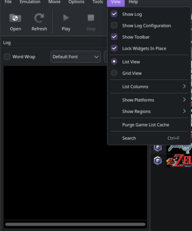
Dolphin has a log feature (View, Show Log). It'll open a black window on the side of the Dolphin main window like this:
Screenshot_20260514_201133.png
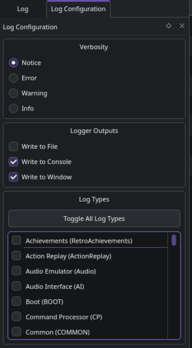
Turn on Show Log Configuration, too.

Screenshot_20260514_202251.png

I assume Verbosity increases as you go down the list, so turn on Warning. I don't know where Dolphin would save the log file if you enabled that option, but you can scroll the logging window and look for problems. As for Log Types, I also don't know. Turning them all on makes sense, but that'll greatly increase everything you have to sift through trying to figure out what's causing your issue. Try to open one of the translations again, then look to see if anything useful pops up in the log window.

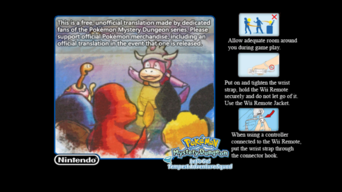
Were it me, I'd track down the original releases without the translation applied and see if they work. If they do, look at the logs the originals generate, then try to find which errors and warnings are 'new' or different when you open the translations. I know the translations did more than modify the text like the Wiimote strap/keep playing area open screen being completely different to include a notice about supporting an official translation when one appears, but is that enough to break your Dolphin? But then why yours and not mine or tonyhoro's?

I looked at the Dolphin wiki and didn't see anything about the black screen, but I don't know if people reported using the originals or not.

I'm about out of ideas, so best of luck with this.
 
Tested on Dolphin 2603a on Windows 1

My Config -> Graphics settings are the default ones overall, but the backend is direct3d 11, not vulkan.

Running perfectly. I tested the 3 roms and they all work the same, despite some graphical glitchs at the first loading screen which is purple for some reason, but after that, the game runs fine.

Just to cover all the bases: are you guys extracting the .7z file? You need to open the .wad on Dolphin.
1000017370.jpg
1000017368.jpg


There you have it, as I said before, it stays black and nothing happens, I tried the configuration of the person below and the game stays like that
 
Hey, I downloaded all three and tried them in the emulator, but when I run them I get a black screen and nothing happens.


Tested on Dolphin 2603a on Windows 1

My Config -> Graphics settings are the default ones overall, but the backend is direct3d 11, not vulkan.

Running perfectly. I tested the 3 roms and they all work the same, despite some graphical glitchs at the first loading screen which is purple for some reason, but after that, the game runs fine.

Just to cover all the bases: are you guys extracting the .7z file? You need to open the .wad on Dolphin.
 

Attachments

  • test01.png
    test01.png
    372 KB · Views: 10
  • test02.png
    test02.png
    613.3 KB · Views: 11
Last edited:
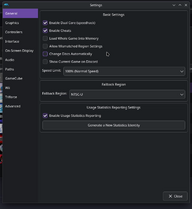
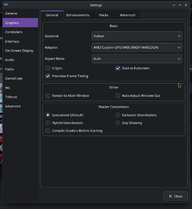
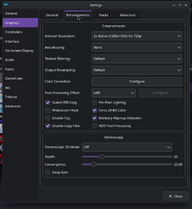
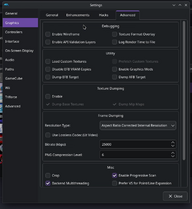
I'm not sure what advice I can give here, sorry. I attached pictures of my settings if that might help some. I set things up a good while back, so I don't remember what I've done differently from defaults except 2x upscaling.

View attachment 184884View attachment 184885View attachment 184886View attachment 184887View attachment 184888View attachment 184889View attachment 184890

Do .wads of other games work?
i have pokemon rumble weekend and that one works.
 
I checked and I do have the .wad files. I tried changing the graphics engines and it didn't work either. I have Dolphin 2603-267 and Windows 11.
I'm not sure what advice I can give here, sorry. I attached pictures of my settings if that might help some. I set things up a good while back, so I don't remember what I've done differently from defaults except 2x upscaling.

A.pngB.pngC.pngD.pngE.pngF.pngG.png

Do .wads of other games work?
 
I'm not getting the black screen here. I'm running Dolphin 2603a on Linux and gave Tempest a try. I had a purple screen while it was loading, but I got as far as the title and options before I shut it down. I didn't try the other PMD .wads, but I imagine they'll work the same.

I copied the NAND from my Wii to Dolphin earlier and installed the .wad there, but I tried a .wad for another game and had it work without installing. You probably don't need the NAND yourself.

Make sure you're extracting the .7z to get the .wad, though Dolphin should spit an error if you try to load the .7z anyway.
Also, check the version number for Dolphin. I know in the past, there were issues with people using the ancient Stable version when recent releases were listed under Beta or Nightly or something.

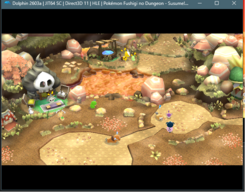
Screenshots of it working:


'View attachment 184833View attachment 184823View attachment 184834
I checked and I do have the .wad files. I tried changing the graphics engines and it didn't work either. I have Dolphin 2603-267 and Windows 11.
 
I'm not getting the black screen here. I'm running Dolphin 2603a on Linux and gave Tempest a try. I had a purple screen while it was loading, but I got as far as the title and options before I shut it down. I didn't try the other PMD .wads, but I imagine they'll work the same.

I copied the NAND from my Wii to Dolphin earlier and installed the .wad there, but I tried a .wad for another game and had it work without installing. You probably don't need the NAND yourself.

Make sure you're extracting the .7z to get the .wad, though Dolphin should spit an error if you try to load the .7z anyway.
Also, check the version number for Dolphin. I know in the past, there were issues with people using the ancient Stable version when recent releases were listed under Beta or Nightly or something.

Screenshots of it working:


'Screenshot_20260514_142530.pngScreenshot_20260514_135608.pngScreenshot_20260514_142603.png
 
Oh I remember this game, thought it was already on the repo haha. Thought this was an addendum and someone had added something but it's just the regular game lol which is cool.

Also I'm super biased towards Ranch since I grew up with it, but I am grateful we got it over Wii mystery dungeon since this doesn't seem to have much of a story or postgame compared to Explorers of Sky.
This game definitely focuses on gameplay more than plot and it shows. These 3 easily have the best dungeon crawling when pitted against the first 3 PMD games. The stacking mechanic adds a super cool level of depth to teambuilding that NONE of the other PMD games have
 
Can i play this on dolphin emulator? can I play it using Switch Pro controll?

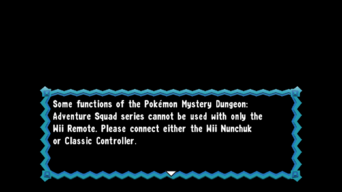
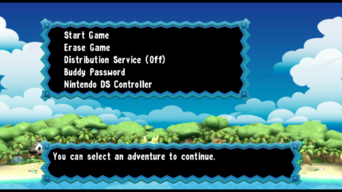
From what I could test, you need to configure your controller as a nunchuck, classic controller or gamecube controller. Playing it as a single wiimote won't give you all features of the game, as it's stated in the first screen when you boot up.
 

Users who are viewing this thread

Connect with us

Support this Site

RGT relies on you to stay afloat. Help covering the site costs and get some pretty Level 7 perks too.

Featured Video

Latest Threads

TV Shows That Get Better as They Go

It seems that a lot of shows peak in season 1, or at least progressively get worse the longer...
Read more

What are your thoughts on DeviantArt?

Even though I'm no artist myself (and I'm talking stick-figure level here), I made a DeviantArt...
Read more

Xbox 360 Game recommendations

So me & my sister's boyfriend found an old Xbox 360 over at his house with two controllers...
Read more

9 steam games you want to spread

Cool site I came across: 9games.pages.dev
Read more
Back
Top