- Joined
- May 4, 2026
- Messages
- 8
- Level up in
- 17 posts
- Reaction score
- 0
- Points
- 1


 github.com
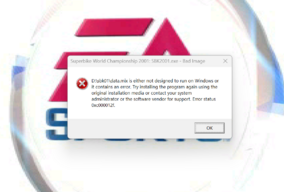
im already install microsoft c++ and use ddraw its still pop up like this even though its perfectly fine on my friends laptop on win 10Have you installed Microsoft visual c++ packages?
If nothing helps try putting ddraw.dll into game folder

Releases · narzoul/DDrawCompat
DirectDraw and Direct3D 1-7 compatibility, performance and visual enhancements for Windows Vista, 7, 8, 10 and 11 - narzoul/DDrawCompat




still doesnt work@Jorge_Lorenzo - Oh, you're trying to run Superbike World Championship 2001, huh?
Well, the "Bad Image" error code 0xc000012f usually indicates that Windows is trying to load a file (in this case, data.mix) that it believes is corrupt or incompatible with the current system architecture. That means Windows is struggling to read the data.mix file, likely because the game is over 20 years old and doesn't naturally understand how to communicate with modern 64-bit operating systems or newer graphics drivers. As far as I know, that's what you could try:
1 - "Compatibility Mode & Admin Rights" fix for old EA Sports titles:
– Go to your game installation folder.
– Right-click SBK2001.exe and select Properties.
– Go to the Compatibility tab and check "Run this program in compatibility mode for" and select Windows XP (Service Pack 3) or Windows 98 / Windows Me.
– Check the box at the bottom: "Run this program as an administrator", click Apply and try launching the game again.
2 - Use dgVoodoo 2: old DirectX 7/8 games often crash because modern graphics cards don't "speak" their language anymore. dgVoodoo 2 acts as a translator (called wrapper). So...
– Download dgVoodoo 2.
– Open the MS\x86 folder inside the download and copy the .dll files into your main game folder.
– Run dgVoodooCpl.exe to configure your resolution.
This usually fixes "Bad Image" errors related to data files by stabilizing the environment the game runs in.
3 - Enable DirectPlay
It happens that Windows 10 and 11 turn off old gaming libraries by default.
So, you could try to type "Turn Windows features on or off" in your Windows search bar and find Legacy Components.
Expand it and check the box for DirectPlay, then click OK and restart your PC.
4 - The error points to D:\sbk01\data.mix: if playing from a CD/ISO, your drive or virtual mount might be having trouble reading the file. Try copying the entire game folder to your local C: drive and running it from there (unless the file is corrupted, so you may need to reinstall the game or find a cleaner source wher to download it).
Also, well, old games like this can be very picky about modern widescreen monitors, so... Did you try running it in a lower resolution (like 800x600) first in order to ensure stability?
1. from https://www.myabandonware.com/game/superbike-2001-ddg@Jorge_Lorenzo - Hmm
Well, this makes me think the file is corrupted...
This error appears when the data.mix file is corrupted, or the installation was performed from an incomplete copy or a corrupt rip.
If the file is corrupted, you should do a "clean" reinstall of the game:
1 - Uninstall SBK2001
2 - Delete the remaining folder (usually C:\Program Files (x86)\SBK2001)
3 - Reinstall from an original ISO (or a verified installation)
4 - Launch the game before applying patches or mods (if you did it)
Also: have you tried installing the unofficial patch for Windows 10/11?
As far as I know, there's a patch that replaces some incompatible DLLs, fixes startup errors, and prevents the data.mix file from crashing.
Anyway... How did you install SBK2001?
- From the original CD?
– From an ISO?
– From a copy found online?
– From a pre-made installer?
both already tried and ended up dont works but only works on win 10@Jorge_Lorenzo - Well, mate, that site isn't very well known for the reliability of the ISOs it provides...
Often, I too had problems with it.
Anyway, this still makes me think the "data.mix" file is corrupted. That file contains:
- tracks
- textures
- game scripts
and more.
Is the game you downloaded a full ISO, or is it a rip???
i try the original and install community patch its still doesnt works@Jorge_Lorenzo - Hmm... So, have you already tried the community patch?
You didn't tell me if the game is original or a ripped and compressed version.
i already try that but ended up black screen/not loading up the game@Jorge_Lorenzo - Oh, wait a second... So the game is from the original CD? Well, that changes things, because then the data.mix file isn't corrupt.
The error message in this case is misleading:
Windows 11 reports "data.mix" because it's the first file the game attempts to open, but the error is likely due to a DLL required by the game that can't be loaded on Windows 11.
Windows 11 has removed—or blocked—some legacy libraries that Windows 10 still loaded.
At this point, what you should try, if you haven't already, is:
1) Install DirectX 9.0c (legacy runtime)
since Windows 11 no longer includes it.
2) Install ALL x86 Visual C++ (2005 to 2022)
since Windows 11 no longer includes some versions required by older games.
3) Run in XP SP3 compatibility mode (administrator)
And if the game still doesn't launch even after this procedure, well, the only solution I know of is to use dgVoodoo2, which "replaces" the old DirectX 7/8 with modern versions compatible with Windows 11.