Final Fantasy VII (USA) PSX ISO

Maliken

New Challenger
Level 0
16%
Joined
Jan 29, 2025
Messages
4
Level up in
21 posts
Reaction score
3
Points
2
No, the bios folder should only have the PSX bios, not the game files. You'll need to put the PSX bios files there if you want to do any PSX emulation. You can find those on The Repo.

I'm assuming you're on the stock firmware, correct? If so, you'll need to go into "Roms" folder and there you should see the subfolders for each of the consoles (such as PSX and GBA). Put the Final Fantasy 7 disc images there. Just make sure that the files have been extracted from the 7z files since I don't believe that the emulators can read "7z" files.

I would recommend replacing the SD card that came with the system since the ones that come with those handhelds tend to be cheap ones that don't last.

I found a guide that should be able to help you out if you have any questions:
 
Last edited:
No, the bios folder should only have the PSX bios, not the game files. You'll need to put the PSX bios files there if you want to do any PSX emulation. You can find those on The Repo.

I'm assuming you're on the stock firmware, correct? If so, you'll need to go into "Roms" folder and there you should see the subfolders for each of the consoles (such as PSX and GBA). Put the Final Fantasy 7 disc images there. Just make sure that the files have been extracted from the 7z files since I don't believe that the emulators can read "7z" files.

I would recommend replacing the SD card that came with the system since the ones that come with those handhelds tend to be cheap ones that don't last.

I found a guide that should be able to help you out if you have any questions:
I'm running a custom firmware on my anbernic RG35XXSP its running knulli and I have a two SD card set up one running the OS and one for my separate Roms files and what not.
 
I'm running a custom firmware on my anbernic RG35XXSP its running knulli and I have a two SD card set up one running the OS and one for my separate Roms files and what not.
Oops, missed that. Here's another guide that should be able to help:
 
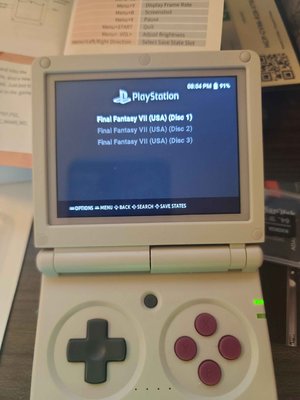
So I downloaded and extracted all 3 discs into my Roms folder this is what my question was about its in 3 separate Disc files the game itself, will it save over and continue once I'm done Disc 1 and continue to Disc 2 or how does this game work lmao?
 

Attachments

  • FF7.jpg
    FF7.jpg
    125.2 KB · Views: 41
I believe you'll need to switch disks when you get the screen saying to do so. These devices are running Retroarch under the hood for the emulators, so it's the same way you'd switch discs there. You'll need to go to the Emulator menu (I believe it's menu button + B together) and then go to "Disc Control". Here, "click eject disk" and then "load new disk". Select the next disc, go back to the "Disc Control" screen and then click on the "Insert Disc" option to load the next disc.
 
I believe you'll need to switch disks when you get the screen saying to do so. These devices are running Retroarch under the hood for the emulators, so it's the same way you'd switch discs there. You'll need to go to the Emulator menu (I believe it's menu button + B together) and then go to "Disc Control". Here, "click eject disk" and then "load new disk". Select the next disc, go back to the "Disc Control" screen and then click on the "Insert Disc" option to load the next disc.
Okay ill try that thank you for the information.
Post automatically merged:

I believe you'll need to switch disks when you get the screen saying to do so. These devices are running Retroarch under the hood for the emulators, so it's the same way you'd switch discs there. You'll need to go to the Emulator menu (I believe it's menu button + B together) and then go to "Disc Control". Here, "click eject disk" and then "load new disk". Select the next disc, go back to the "Disc Control" screen and then click on the "Insert Disc" option to load the next disc.
Just ran into an issue I tried to launch disc 1 and it brought me back to the screen launcher so I must have extracted something wrong I made sure it was the right file before running my RG35XXSP the right file format. its in a 7zip file I extracted with WinRAR that's probably why lol. but it was in the same readable file in a CUE file.

Edit** got it to run after I extracted it with z7ip nvm.
 
Last edited:
If the game doesn't have any music tracks (and FF7 doesn't) i've had no troubles converting the bin to an iso and mounting it, saves space and doesn't need the ECC component. Though that was back early 2000 when i was using ePSXe emulator and it also let me do cdz format...

Anyways. Make sure the save card is shared and when it tells you to switch discs it will also save. Swap discs and load the save.

Though if the emulator supports m3u files...
 
Beware: There have been no replies in this thread for 90 days.
Keep that in mind when expecting a reply from the people on it,
You can also start a new thread instead. This is just a heads-up, bumping is allowed in this forum.

Users who are viewing this thread

Connect with us

Support this Site

RGT relies on you to stay afloat. Help covering the site costs and get some pretty Level 7 perks too.

Featured Video

Latest Threads

The 12 games of Christmas

On the first day of Christmas my true love gave to me The Legend of Zelda...

Read more

Thought on the Pragmata demo?

As those following Capcom's new IP may know, a demo was just released for Steam, running for...
Read more

I finished high school.

SerThis year I will finish high school.I'm going to find something to do, watch anime, play...
Read more

Bought a 360 for £15 at a carboot sale

Went to a local carboot sale (garage sale I think you call them in the States) a few weeks back...
Read more

Club Penguin Elite Penguin Force - Portuguese Translation

The game is completely translated to Portuguese! Every dialog, item name and text have been...
Read more

Online statistics

Members online
91
Guests online
701
Total visitors
792

Forum statistics

Threads
15,416
Messages
373,036
Members
896,638
Latest member
AndresKokuo

Advertisers

Back
Top