Windows Arcturus (English Patched) Windows

CSmith327

Final Form
Repo Curator
Level 5
1%
Joined
Dec 1, 2024
Messages
1,014
Level up in
1486 posts
Reaction score
1,749
Points
4,477
Location
North Carolina, USA
arcturus-cover.webp


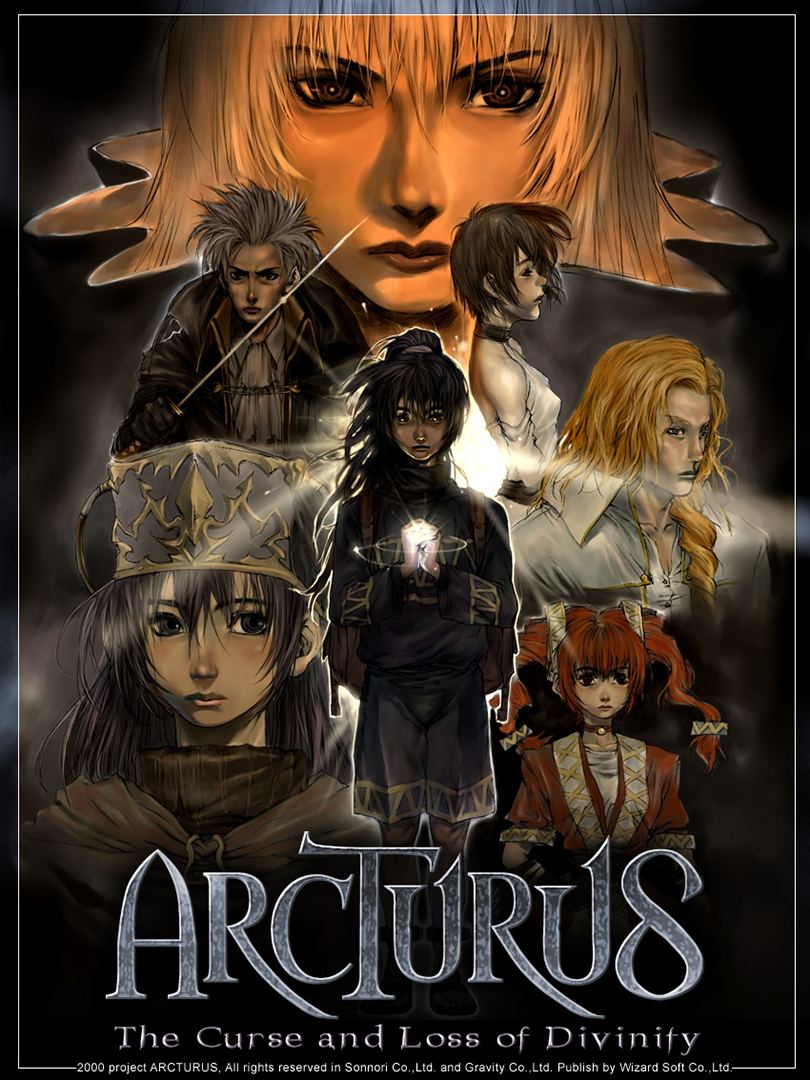
This is a popular Korean RPG that was translated and localized for Japan by Nihon Falcom on June 28, 2003. This translation is based off of that localization. There were plans to bring the game to western audiences. Those plans never came to fruition, although an official English demo exists. It's been widely speculated that this game is what helped inspire Falcom to develop Trails in the Sky. Translation Credits: Released by: Helly Language: English Status: 90% Complete (some misc. pictures with text weren't able to be worked on) Patch Version: not numbered Date: 30 April 2018 Source and details: https://www.romhacking.net/forum/index.php?topic=23958.0 […]

Download Links​

 
Run the cpl file, and set how you like in the general and DirectX tabs. Can disable DGvoodoo watermark after confirming it all works. Apply settings, close it, and start Arcturus.exe and select the second option from top. DGVoodoo's virtual card should be selected by default, but do so if not.

View attachment 148782

Pick desired resolution, hit OK and enjoy. Am using 1920x1080 and nothing seems broken so far.

View attachment 148777
View attachment 148778
View attachment 148779

Note: at first glance, you'll notice my title screen is stretched is comparison to OP's example (the trees in background), but the actual title banner is seemingly not. So I'm wondering if the actual 3D assets also are not, but cba to confirm (but they look the same to me). As it stands, the game looks great either way, just pick the resolution you prefer.

Lastly, thanks for the up. *nods*

Proof of no DX8 install from dxdiag:
View attachment 148781

I did what you said and for some reason the textures break and everything becomes white. Do you know what might be causing it?

Arcturus 30_1_2026 04_33_59.png
Arcturus 30_1_2026 04_33_18.png
 
Hey, you got it. Happy to help out. DGVoodoo is great for older DX 1-8, and even 9 sometimes. Can do 3dfx and glide stuff too (though many of the ones worth playing have source ports).

As for AntimicroX, it's sort of a freeware alternative to Xpadder, and is readily available on github, so I chose to map with it. I think Xpadder may be a bit more comprehensive in its settings, but AntimicroX allows a whole lot, and is probably fine for most games. Don't quote me, though, I haven't used Xpadder in ages.

You can set more than one key or mouse function to a single joypad button, and you can use auto profile to enable using a set file with all the binds for a particular game, based on running process name (handy!). So it can 'intelligently' pick the right profile when a game starts. I have antimicrox set to run while Arcturus runs, and the process is killed when I exit (batch script). It's pretty cozy.

I just added right mouse button to B on 360 pad. I might rework my mapping; not thrilled with this arrangement, but it works.
Thanks, I installed it earlier. I'll test it out later and see how I like it. I tried reWASD at one point and didn't like it since it messed up my GameSir T4 Pro to always connect as a Switch Pro controller instead of Xbox and I had to start using it wired. Xpadder is so much better, but AntimicroX seems like the best freeware alternative. JoyToKey kinda sucks imo
 
I appended your info to the post description and added a new screenshot reflecting it. Thanks for this super helpful info. I've been wanting to play this game using my full laptop's resolution ever since I found it years ago and now I finally can.
Post automatically merged:


Have you ever used Xpadder? If so how does antimicroX compare to it? I've been using Xpadder for years and I'm pretty happy with it, but if that one is an improvement I might look into it

Hey, you got it. Happy to help out. DGVoodoo is great for older DX 1-8, and even 9 sometimes. Can do 3dfx and glide stuff too (though many of the ones worth playing have source ports).

As for AntimicroX, it's sort of a freeware alternative to Xpadder, and is readily available on github, so I chose to map with it. I think Xpadder may be a bit more comprehensive in its settings, but AntimicroX allows a whole lot, and is probably fine for most games. Don't quote me, though, I haven't used Xpadder in ages.

You can set more than one key or mouse function to a single joypad button, and you can use auto profile to enable using a set file with all the binds for a particular game, based on running process name (handy!). So it can 'intelligently' pick the right profile when a game starts. I have antimicrox set to run while Arcturus runs, and the process is killed when I exit (batch script). It's pretty cozy.

I just added right mouse button to B on 360 pad. I might rework my mapping; not thrilled with this arrangement, but it works.
 
Thank you; you just killed any potential interest I had in the game.
The game don't have this working design text.
That text was from a english demo from way back (it just have Sizz prologue)
 
Do what I just added for dgVoodoo as described by The_Real_Thing but choose 1600x900 instead. I just tested it just now after seeing your comment and it works fine with that screen resolution option too
Post automatically merged:
I see, thank you very much for testing the game. ::thumbsupwario
 
Don't need to install DX8, just used DGVoodoo and can play at 1920x1080 no problems at all. It converts DX8 calls to more modern DX. Setting compatibility on exes and changing display settings also not necessary this way (at least here). Basically, install the game as outlined above, skip DX8 install, and download this instead. In the zip, grab dgvoodoocpl.exe, the conf file, and throw those in this game's dir right next to the main exe. Then go into the zip's MS folder, x86, then grab all those dll files except for DX9 one, and place those next to the others in main game dir.

Run the cpl file, and set how you like in the general and DirectX tabs. Can disable DGvoodoo watermark after confirming it all works. Apply settings, close it, and start Arcturus.exe and select the second option from top. DGVoodoo's virtual card should be selected by default, but do so if not.

View attachment 148782

Pick desired resolution, hit OK and enjoy. Am using 1920x1080 and nothing seems broken so far.

View attachment 148777
View attachment 148778
View attachment 148779

Note: at first glance, you'll notice my title screen is stretched is comparison to OP's example (the trees in background), but the actual title banner is seemingly not. So I'm wondering if the actual 3D assets also are not, but cba to confirm (but they look the same to me). As it stands, the game looks great either way, just pick the resolution you prefer.

Lastly, thanks for the up. *nods*

Proof of no DX8 install from dxdiag:
View attachment 148781
I appended your info to the post description and added a new screenshot reflecting it. Thanks for this super helpful info. I've been wanting to play this game using my full laptop's resolution ever since I found it years ago and now I finally can.
Post automatically merged:

What happens if you try to run in other resolutions than 1280x1024? I ask because the max my 20' monitor supports is 1600x900.
Do what I just added for dgVoodoo as described by The_Real_Thing but choose 1600x900 instead. I just tested it just now after seeing your comment and it works fine with that screen resolution option too
Post automatically merged:

If you right click your character a popup with menu items appears. Left tabs, pick Diary, then options to the right. Lets you pick from different schemes and shows the keys used. I had the same thought, but figured controlling a mostly-mouse game with J2K might be a bit clunky. Might try though, because would be nice to kick back and play it.

Edit: can move with arrow keys, and use left ALT for interacting. The other controls are for changing POV (Can map to shoulder buttons). Got a bit more doable.

Edit2: made a profile for antimicroX if anyone wants to try it out. Is setup for a 360 controller, but shouldn't be hard to tweak based on what it's set as now. https://pastebin.com/t1jAZ3Cs Copy/paste this pastebin's contents into a file and rename as Arcturus.gamecontroller.amgp, then load it in antimicroX.

Left stick does arrow keys, right stick does mouse (not sure how to adjust acceleration, but it works), B and Y do zoom levels, A and X do mouse left click, left alt, and mouse right click respectively. Triggers do POV rotation. Talking to NPCs using A button is oft fiddly based on relative location, so added right stick mouse and basic left click to scheme if needed.
Have you ever used Xpadder? If so how does antimicroX compare to it? I've been using Xpadder for years and I'm pretty happy with it, but if that one is an improvement I might look into it
 
Last edited:
What happens if you try to run in other resolutions than 1280x1024? I ask because the max my 20' monitor supports is 1600x900.
 
You need to double check that Rayman fact...
I wasn't speaking specifically of american culture with rayman, but of the character's national importance, though i get how the meaning got mixed up, sorry for the mixup.

Rayman for france.
 
Thank you; you just killed any potential interest I had in the game.
I'm not actually sure if that screenshot is of the translation or from someone showing off the official English demo that was made. I just went around picking out any screenshots that had English text in them from random sites. Some of the sites I went to predated the translation. One screenshot was from a forum post on a site in 2013 (the one with the grave) so I think at least two of them with English text aren't of the translation applied in this post. So you might never run into that line of text when playing it. So please don't disregard this wonderful game just because of that one screenshot. I might go back and comfirm if that was from the demo and delete it from the post gallery
Post automatically merged:

Good to know I have more Working Designs-coded kino in my future
ugh... i hope this was a leftover from the english localized demo and not from a fan translator...
Thank you; you just killed any potential interest I had in the game.
I can confirm that text is not in this translation. I watched Bowl of Lentils' YouTube walkthrough that used this patch and that scene happens about 2 hours into the game. It's when Eispien is teaching Maria about skills in battle. She doesn't say that line about the Superbowl. She just basically says that it tired her out. That screenshot must have been from an older previous attempt at injecting text into the game and they just wanted to be silly with it for some reason. I don't think it was from the demo since it didn't reach that point of the game. (It was basically like an E3 demo) I'll remove that from the gallery
 
Last edited:
anyone know the control scheme here i wanted to use a controller and it doesnt work right off the bat but i thought id try joy to key but theres no control config to see what they are.

thanks
If you right click your character a popup with menu items appears. Left tabs, pick Diary, then options to the right. Lets you pick from different schemes and shows the keys used. I had the same thought, but figured controlling a mostly-mouse game with J2K might be a bit clunky. Might try though, because would be nice to kick back and play it.

Edit: can move with arrow keys, and use left ALT for interacting. The other controls are for changing POV (Can map to shoulder buttons). Got a bit more doable.

Edit2: made a profile for antimicroX if anyone wants to try it out. Is setup for a 360 controller, but shouldn't be hard to tweak based on what it's set as now. https://pastebin.com/t1jAZ3Cs Copy/paste this pastebin's contents into a file and rename as Arcturus.gamecontroller.amgp, then load it in antimicroX.

Left stick does arrow keys, right stick does mouse (not sure how to adjust acceleration, but it works), B and Y do zoom levels, A and X do mouse left click, left alt, and mouse right click respectively. Triggers do POV rotation. Talking to NPCs using A button is oft fiddly based on relative location, so added right stick mouse and basic left click to scheme if needed.
 
Last edited:
anyone know the control scheme here i wanted to use a controller and it doesnt work right off the bat but i thought id try joy to key but theres no control config to see what they are.

thanks
 
so this predates kiseki..
To go into a bit more detail, this is a korean rpg that falcom translated into japanese to sell to japanese audiences, it's VERY popular in korea and fairly popular in japan, anyway the game has alot of similarities with trails in the sky FC and SC, namely tone and style of play, with the creator of trails i believe even crediting the game with inspiring him to make trails in the sky (i believe, but don't quote me on it, that alot of koreans consider trails in the sky the spiritual successor to arcturus).

As for the game itself, to say this is a important game to koreans is a understatement, to koreans it's something like what master chief and rayman are in the us, a symbol of their nation's gaming culture.
 
Holy shit, thank you
I found this game way way back then on some pirate sites, could never play pass 15 minutes due to some errors . Now I can try it again.
 
Don't need to install DX8, just used DGVoodoo and can play at 1920x1080 no problems at all. It converts DX8 calls to more modern DX. Setting compatibility on exes and changing display settings also not necessary this way (at least here). Basically, install the game as outlined above, skip DX8 install, and download this instead. In the zip, grab dgvoodoocpl.exe, the conf file, and throw those in this game's dir right next to the main exe. Then go into the zip's MS folder, x86, then grab all those dll files except for DX9 one, and place those next to the others in main game dir.

Run the cpl file, and set how you like in the general and DirectX tabs. Can disable DGvoodoo watermark after confirming it all works. Apply settings, close it, and start Arcturus.exe and select the second option from top. DGVoodoo's virtual card should be selected by default, but do so if not.

ScreenShot002.jpg


Pick desired resolution, hit OK and enjoy. Am using 1920x1080 and nothing seems broken so far.

ScreenShot003.jpg

ScreenShot004.jpg

ScreenShot005.jpg


Note: at first glance, you'll notice my title screen is stretched is comparison to OP's example (the trees in background), but the actual title banner is seemingly not. So I'm wondering if the actual 3D assets also are not, but cba to confirm (but they look the same to me). As it stands, the game looks great either way, just pick the resolution you prefer.

Lastly, thanks for the up. *nods*

Proof of no DX8 install from dxdiag:
ScreenShot006.jpg
 

Attachments

  • ScreenShot001.jpg
    ScreenShot001.jpg
    48 KB · Views: 41
Last edited:
another one to the backlog, yay
 

Users who are viewing this thread

Connect with us

Support this Site

RGT relies on you to stay afloat. Help covering the site costs and get some pretty Level 7 perks too.

Featured Video

Latest Threads

SEGA decides to get busy...

So, everyone's already been talking about the Crazy Taxi...
Read more

Games similar to Valkyrie Profile 2: Silmeria?

I'm having a blast with this game. I'm not even halfway through it yet, but I know for a fact...
Read more

Cartoon Trope you are surprised it is canon to reality?

Cartoons, part of their fun is seeing impossible stuff happen onscreen, but sometimes, something...
Read more

Your brawler/beat'em up/hack n slash mains

Needed to make a counterpart to the fighter mains. Don't matter if it's a 2D, 2.5D, or 3D...
Read more

Goblins

Twice is a coincidence, three's a pattern, and I've noticed an uptick in goblin employment over...
Read more

Online statistics

Members online
96
Guests online
2,759
Total visitors
2,855

Forum statistics

Threads
19,776
Messages
501,070
Members
926,791
Latest member
magicthethiccening

Today's birthdays

Advertisers

Back
Top