
- Joined
- Oct 9, 2024
- Messages
- 562
- Level up in
- 438 posts
- Solutions
- 2
- Reaction score
- 1,145
- Points
- 2,477
So, I am making this thread to semi document what I found with RetroArch playlist parsing. I even told about it that one of the main devs said "Does not work like that" but yet it does as far as I've made it work and the functionality has not changed in few years yet.
First assumption is that you are user who has the ROM collection scanned to your RetroArch, have thumbnails too.
Secondly you have a grouping of games you'd want in one collection. Game series is one easy assumption like a playlist for your Castlevania Games, Mega Man games, maybe one for fighting games or just all the Tetris games your collection has.
The bad news out front is that the setup requires to know or learn of RetroArch's folders and files for playlists and asset files if it comes to that. You have to be comfortable with a text editor and copy pasting stuff around, using CTRL+F and such. But the end results can be neat and extremely useful for you:
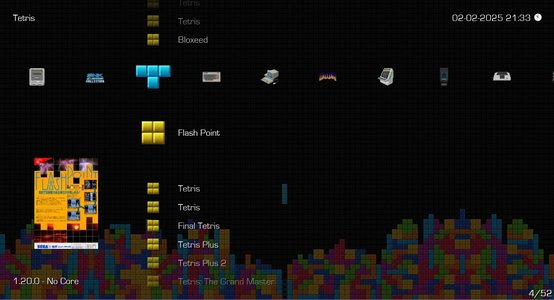
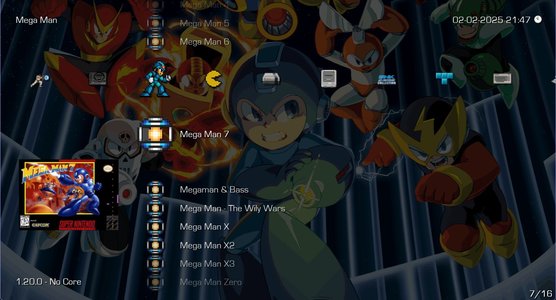
Do note first and foremost that if you use compressed playlists, you should at least for the creation of these playlists disable the option, and maybe scroll through your playlists so they get "decompressed" back into more plain text form. If you wish to use compressed playlists you should be mostly OK with the feature afterwards, but every edit you wish to make for your custom playlists needs the same song and dance to be repeated.
To Begin with the guide proper;
Go to your retroarch main folder. This is different for system you use RetroArch on, very simple on PC and Nintendo switch. Go to your playlist folder and create a new text file, or make a copy of existing playlist you have for a base. Naming scheme I use for collections is "Collection - Tetris.lpl" or "Collection - Mega Man.lpl". If you wish to use the setting that displays only the "system name" for base RetroArch playlists, "Collection" is not shown but still categorizes the playlists before most other system specific playlists. You can really do anything you want.
After this, you need to use text editor of your choice to open the main playlists for games you wish to add. Say, for Mega Man, you'd fill in entries from NES up to PS1 or even DS. You copy and paste their entries and include and keep the "label" & "db_name" entries intact. This trick will make RetroArch look up metadata info per playlist entry from fileset of another.
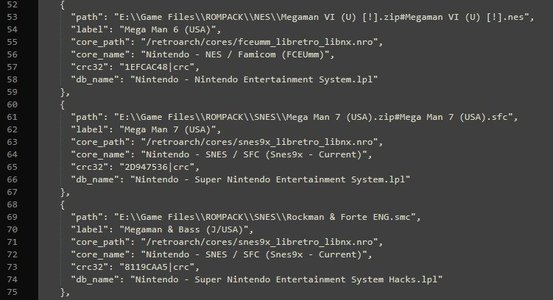
In my example for mega man games, each box art is looked from the folders that "db_name" points to. Basically elaborate fake shortcut to games and their additional files. Downside is these playlist need to be managed more manually, usually in text editor by yourself, adding new games is not as simple as with RetroArch's UI, and all these playlists you create will have generic icons in the list by default, unless you do something about it.
Doing something about the icons for your playlist:
Hardest part to pimpin' out your RA UI with these nifty playlists after text editor is an image editor. This part is wildly different depending which theme you prefer, unless the theme you prefer is RGUI in which case you were already done! I can give examples only for XMB and Ozone themes as these are the menu systems I like to use myself. By Base example; you go to /retroarch/assets/<xmb or ozone> / and your theme, or for ozone, icons folder. This is also part I cannot be entirely sure for ozone, as it used to if not still references to /assets/xmb/monochrome/ theme. I am fairly sure ozone icons go to /assets/ozone/png/icons/.
Still; TL;DR: Go to
/retroarch/assets/xmb/theme/png/ for XMB theme. Additional recommendation is to create a new folder called "Custom" inside "xmb" folder, copy paste assets of your favorite xmb theme. This way asset updates do not ruin your customizations, but you have to choose the custom theme in settings.
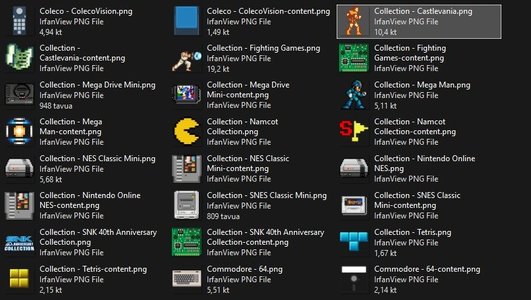
Then, it is matter of creating PNG files fitting for theme you are running, naming them accordingly to example 3 and your own playlists, and you are done.
I am attaching my Switch, Ozone/Monochrome and XMB Dot-Art icons for few example collections I've made.
Also: My writing is scatterbrained and I rushed the ending of this. Feedback to make this more understandable and helpful to everyone is nothing but appreciated, I know there is likely more than one "what the hell?" sentences I've missed.
Still, this is entirely undocumented yet fun and useful way to use retroarch's playlist system to essentially have same content in multiple playlists. In my case, I have used it to have playlists for game series and duplication of official retro collections such as SNK 40th Anniversary.
First assumption is that you are user who has the ROM collection scanned to your RetroArch, have thumbnails too.
Secondly you have a grouping of games you'd want in one collection. Game series is one easy assumption like a playlist for your Castlevania Games, Mega Man games, maybe one for fighting games or just all the Tetris games your collection has.
The bad news out front is that the setup requires to know or learn of RetroArch's folders and files for playlists and asset files if it comes to that. You have to be comfortable with a text editor and copy pasting stuff around, using CTRL+F and such. But the end results can be neat and extremely useful for you:
Do note first and foremost that if you use compressed playlists, you should at least for the creation of these playlists disable the option, and maybe scroll through your playlists so they get "decompressed" back into more plain text form. If you wish to use compressed playlists you should be mostly OK with the feature afterwards, but every edit you wish to make for your custom playlists needs the same song and dance to be repeated.
To Begin with the guide proper;
Go to your retroarch main folder. This is different for system you use RetroArch on, very simple on PC and Nintendo switch. Go to your playlist folder and create a new text file, or make a copy of existing playlist you have for a base. Naming scheme I use for collections is "Collection - Tetris.lpl" or "Collection - Mega Man.lpl". If you wish to use the setting that displays only the "system name" for base RetroArch playlists, "Collection" is not shown but still categorizes the playlists before most other system specific playlists. You can really do anything you want.
After this, you need to use text editor of your choice to open the main playlists for games you wish to add. Say, for Mega Man, you'd fill in entries from NES up to PS1 or even DS. You copy and paste their entries and include and keep the "label" & "db_name" entries intact. This trick will make RetroArch look up metadata info per playlist entry from fileset of another.
In my example for mega man games, each box art is looked from the folders that "db_name" points to. Basically elaborate fake shortcut to games and their additional files. Downside is these playlist need to be managed more manually, usually in text editor by yourself, adding new games is not as simple as with RetroArch's UI, and all these playlists you create will have generic icons in the list by default, unless you do something about it.
Doing something about the icons for your playlist:
Hardest part to pimpin' out your RA UI with these nifty playlists after text editor is an image editor. This part is wildly different depending which theme you prefer, unless the theme you prefer is RGUI in which case you were already done! I can give examples only for XMB and Ozone themes as these are the menu systems I like to use myself. By Base example; you go to /retroarch/assets/<xmb or ozone> / and your theme, or for ozone, icons folder. This is also part I cannot be entirely sure for ozone, as it used to if not still references to /assets/xmb/monochrome/ theme. I am fairly sure ozone icons go to /assets/ozone/png/icons/.
Still; TL;DR: Go to
/retroarch/assets/xmb/theme/png/ for XMB theme. Additional recommendation is to create a new folder called "Custom" inside "xmb" folder, copy paste assets of your favorite xmb theme. This way asset updates do not ruin your customizations, but you have to choose the custom theme in settings.
Then, it is matter of creating PNG files fitting for theme you are running, naming them accordingly to example 3 and your own playlists, and you are done.
I am attaching my Switch, Ozone/Monochrome and XMB Dot-Art icons for few example collections I've made.
Also: My writing is scatterbrained and I rushed the ending of this. Feedback to make this more understandable and helpful to everyone is nothing but appreciated, I know there is likely more than one "what the hell?" sentences I've missed.
Still, this is entirely undocumented yet fun and useful way to use retroarch's playlist system to essentially have same content in multiple playlists. In my case, I have used it to have playlists for game series and duplication of official retro collections such as SNK 40th Anniversary.