GBA Castlevania: Aria of Sorrow - Color Improvement GBA ROM

RageBurner's iconRageBurner

The Struggler
Moderator
Level 7
100%
Joined
Dec 2, 2024
Messages
5,473
Solutions
3
Reaction score
16,995
Points
10,977
Location
Midland
Aria_of_Sorrow-usa-gba-Coverart.jpg


A great color improvement hack by Piggy Chan, getting rid of the normally ugly and washed out colors in Aria of Sorrow.

Author(s): Piggy Chan!
Version: 1.1
Date: 31st of August, 2025
Status: Playable, actively supported.
Source: https://www.romhacking.net/hacks/9121/

Download from Repo​

 
I feel like most people think the GBA's colors are simply brighter to compensate for the lack of backlight, but it's more than that. Some colors have a slightly altered hue so they can be displayed correctly on the original screen.

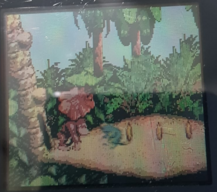
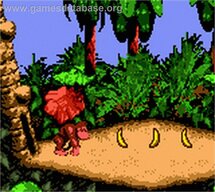
This is even worse with the GBC, where the screen has a yellowish tint. Donkey Kong Country on it looks extremely reddish in the emulator, but on the original console, it's very faithful to the SNES palette.
Unless I'm using a colour hack I'll use colour correction in the emulator to address this sort of thing.
 
I feel like most people think the GBA's colors are simply brighter to compensate for the lack of backlight, but it's more than that. Some colors have a slightly altered hue so they can be displayed correctly on the original screen.

This is even worse with the GBC, where the screen has a yellowish tint. Donkey Kong Country on it looks extremely reddish in the emulator, but on the original console, it's very faithful to the SNES palette.
 

Attachments

  • DKC.jpg
    DKC.jpg
    94.3 KB · Views: 48
  • DKC.png
    DKC.png
    773.8 KB · Views: 55
The classic GBA problem... the lack of a backlight having to be overcompensed in the game's color palette.

This seems like a good way to play in an emulator
 
Which is the best color mod?

There's another one on here by jonataguitar which has two versions, then this version too.
Try both if you can, one might fit your particular tastes more than the other.
 
Which is the best color mod?

There's another one on here by jonataguitar which has two versions, then this version too.
 
Like on the title screens of Final Fantasy Tactics Advance & Sonic Advance 3, is there an option to switch between the two color palettes?
Not really. It would help massively if every GBA game had this, though.
 
In emulation, people should also try the emulator option for Color Correction (it's an option in mGBA), or a shader for GBA color correction (which in RetroArch for example you can then easily combine with a different shader, like an LCD grid line shader). They look excellent. I assume the game-mod version is only ideal for replica or weak hardware.
 
looks dope! while i like aria of sorrow, i never really enjoyed the color palette. i get it was probably made that way so it could be visible on screens without a backlight, but it makes it kinda ugly when viewed on an emulator
I dunno, I still like the original more😆
 
Like on the title screens of Final Fantasy Tactics Advance & Sonic Advance 3, is there an option to switch between the two color palettes?
 
That selection of colors looks quite beautiful like this and it looks less light because it gives it that atmospheric touch that characterizes it for the game and making it look a little better in the Color palette section as well.
 
It should work. Just make sure the save file has the same name, and don't load states after an update (load a normal save, first).
 
looks dope! while i like aria of sorrow, i never really enjoyed the color palette. i get it was probably made that way so it could be visible on screens without a backlight, but it makes it kinda ugly when viewed on an emulator
Happened with a lot of GBA titles, and yes, that was the reason. Games with overbright palette compensation also looked washed out on backlit GBA screens, as well as emulators.
 
looks dope! while i like aria of sorrow, i never really enjoyed the color palette. i get it was probably made that way so it could be visible on screens without a backlight, but it makes it kinda ugly when viewed on an emulator
 
Beware: There have been no replies in this thread for 90 days.
Keep that in mind when expecting a reply from the people on it,
You can also start a new thread instead. This is just a heads-up, bumping is allowed in this forum.

Users who are viewing this thread

Connect with us

Support this Site

RGT relies on you to stay afloat. Help covering the site costs and get some pretty Level 7 perks too.

Featured Video

Latest Threads

Have you kept the manuals to your games?

I feel that this has become an "oh, shit" problem only in retrospective, but it's a big one...
Read more

I just wanted to leave this message for all of you.

1000378259.jpg

OThank you for the conversation, have a great night everyone. I'm going to sleep...
Read more

Petty Playstation Shenanigans, let them fight...


PS1 Startup sounded like you were heading to the future, like it was journey to...
Read more

What is your Best Video Game of the Super, Hyper, Ultra and Mega Prefixes?/Cuál es tu Mejor Videojuego de los Prefijos Super, Hyper, Ultra y Mega?

Well, my best games of each prefix are:
Bueno, mis mejores juegos de cada prefijo son...
Read more

Online statistics

Members online
201
Guests online
1,148
Total visitors
1,349

Forum statistics

Threads
16,001
Messages
388,018
Members
898,690
Latest member
Sr PS2

Today's birthdays

Advertisers

Back
Top