Help Running fan games on Android

Beros

New Challenger
Level 0
52%
Joined
Oct 18, 2025
Messages
13
Level up in
12 posts
Reaction score
17
Points
52
I was wondering if anyone here uses a Android device and can help me out. I bought a Retroid pocket 5 a few days ago and its awesome, i would really love to try out games like castlevania revamped or the lecard chronicles. What would i use to run games like this? Hope someone has expirence with this and thank you all in advance.
 
Step 1: Download Castlevania ReVamped
  • Download the official Windows or Linux version of Castlevania ReVamped from the creator's site.

Step 2: Install Winlator
  • Download and install the Winlator app on your Retroid device. You may need to use a specific version or hotfixed version for better performance, like version 10.1
Step 3: Set up the Winlator container
  • Create a new container within Winlator.
  • Install a turnip graphics driver and set the resolution to
    1920×10801920 cross 1080
  • Set the "Box64 preset" to "Performance" and "Startup Selection" to "Aggressive".
Step 4: Install the game
  • Copy the Castlevania ReVamped installer file to your Retroid's downloads folder.
  • Open the Winlator container and navigate to the downloads folder (labeled "D").
  • Run the installer and follow the on-screen instructions to install the game into the container.
Step 5: Play the game
  • Once installed, you can launch the game directly from within the Winlator container. The controls should be pre-mapped for your handheld device.
 
I have an emulator, Mu, running in the cloud. Plays thousands of games...


Regards.

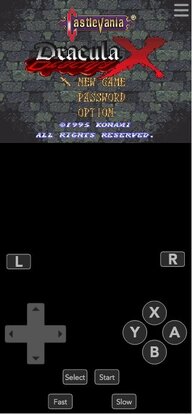
Attachment is of SNES Castlevania
Post automatically merged:

P.S. There is also Super Metroid for SNES
 

Attachments

  • Castlevania.jpeg
    Castlevania.jpeg
    37.7 KB · Views: 13
Last edited:
Winlator is the most common for emulating PC on android, but I can also recommend trying out MiceWine, and seeing which works better. MiceWine uses Wine (hence the name lol), which I can confirm worked great when I used it for emulating Windows on Linux. (also MiceWine's Android build might be better than basic Wine's Android build, since I'm not sure if the latter is still in active development)

https://github.com/KreitinnSoftware/MiceWine-Application

- - - - -

Step 1: Download Castlevania ReVamped
  • Download the official Windows or Linux version of Castlevania ReVamped from the creator's site.

Step 2: Install Winlator
  • Download and install the Winlator app on your Retroid device. You may need to use a specific version or hotfixed version for better performance, like version 10.1
Step 3: Set up the Winlator container
  • Create a new container within Winlator.
  • Install a turnip graphics driver and set the resolution to
    1920×10801920 cross 1080
  • Set the "Box64 preset" to "Performance" and "Startup Selection" to "Aggressive".
Step 4: Install the game
  • Copy the Castlevania ReVamped installer file to your Retroid's downloads folder.
  • Open the Winlator container and navigate to the downloads folder (labeled "D").
  • Run the installer and follow the on-screen instructions to install the game into the container.
Step 5: Play the game
  • Once installed, you can launch the game directly from within the Winlator container. The controls should be pre-mapped for your handheld device.
What is this ai slop man ::injured
 
Best things I have as far as non-hacks or homebrew are either Katawa Shoujo or Super Mario Bros. Crossover. I can't get the controller to set up on the latter, though. 😅
 
RPG Maker/Ren'Py games: JoiPlay and plugins (JoiPlay Patreon, websites like Pokeharbor) You need the main JoiPlay app and a separate plugin for RPG Maker support.

GBA/GBC/NDS ROM hacks: Console emulator (e.g., My Boy!, DraStic), Google Play Store but DraStic you find it on the DraStic page, Requires the game's ROM file to be run.

DOS games: DosBox Turbo, Google Play Store, Designed to run older MS-DOS titles.

Full Windows PC games: Winlator, Winlator GitHub page, a more advanced solution for games not compatible with other launchers.

The most emulators and game files are not available on the Google Play Store. It is important to download them from reputable sources within the fan game community to avoid potential malware.
 
RPG Maker/Ren'Py games: JoiPlay and plugins (JoiPlay Patreon, websites like Pokeharbor) You need the main JoiPlay app and a separate plugin for RPG Maker support.

GBA/GBC/NDS ROM hacks: Console emulator (e.g., My Boy!, DraStic), Google Play Store but DraStic you find it on the DraStic page, Requires the game's ROM file to be run.

DOS games: DosBox Turbo, Google Play Store, Designed to run older MS-DOS titles.

Full Windows PC games: Winlator, Winlator GitHub page, a more advanced solution for games not compatible with other launchers.

The most emulators and game files are not available on the Google Play Store. It is important to download them from reputable sources within the fan game community to avoid potential malware.

(why does this also low key read like ai slop ::unhappy)

I can vouch for JoiPlay if OP is looking at fan games made with RPG maker, though your milage may vary. You'll also need the run time package of whatever the version of RPG maker was used for a particular game (VX, VX Ace, XP etc.). Some games might still end up borked looking though; I was trying Star Stealing Prince, and functionally it's fine, but visually menus in the battles and overworld looked broken. They still functioned though, so you could easily get by just fine with a little muscle memory lol. Remember to get it from the site, since iirc the playstore version is out of date.


As for romhacks, I'd personally recommend GBA.emu over myboy: it's open source, in active development and based on VBA-M. (This is all assuming you aren't going the Retroarch route, in which case I'd recommned mGBA. mGBA also has an unofficial android port, if you feel like testing it out). I can also personally recommend Lemuroid! It's multiple emulators in one, but far less daunting than Retroarch, promise. ::good
 
(why does this also low key read like ai slop ::unhappy)

I can vouch for JoiPlay if OP is looking at fan games made with RPG maker, though your milage may vary. You'll also need the run time package of whatever the version of RPG maker was used for a particular game (VX, VX Ace, XP etc.). Some games might still end up borked looking though; I was trying Star Stealing Prince, and functionally it's fine, but visually menus in the battles and overworld looked broken. They still functioned though, so you could easily get by just fine with a little muscle memory lol. Remember to get it from the site, since iirc the playstore version is out of date.


As for romhacks, I'd personally recommend GBA.emu over myboy: it's open source, in active development and based on VBA-M. (This is all assuming you aren't going the Retroarch route, in which case I'd recommned mGBA. mGBA also has an unofficial android port, if you feel like testing it out). I can also personally recommend Lemuroid! It's multiple emulators in one, but far less daunting than Retroarch, promise. ::good

I don't have much experience with RetroArch but I've heard a lot of good things about it.
 
Step 1: Download Castlevania ReVamped
  • Download the official Windows or Linux version of Castlevania ReVamped from the creator's site.

Step 2: Install Winlator
  • Download and install the Winlator app on your Retroid device. You may need to use a specific version or hotfixed version for better performance, like version 10.1
Step 3: Set up the Winlator container
  • Create a new container within Winlator.
  • Install a turnip graphics driver and set the resolution to
    1920×10801920 cross 1080
  • Set the "Box64 preset" to "Performance" and "Startup Selection" to "Aggressive".
Step 4: Install the game
  • Copy the Castlevania ReVamped installer file to your Retroid's downloads folder.
  • Open the Winlator container and navigate to the downloads folder (labeled "D").
  • Run the installer and follow the on-screen instructions to install the game into the container.
Step 5: Play the game
  • Once installed, you can launch the game directly from within the Winlator container. The controls should be pre-mapped for your handheld device.
Thank you so much
 

Users who are viewing this thread

Connect with us

Support this Site

RGT relies on you to stay afloat. Help covering the site costs and get some pretty Level 7 perks too.

Featured Video

Latest Threads

Gaming Red pills

I just find the name cool.
Anyhow the term Red pill may also be suiting for this thread as I am...
Read more

Dark Souls 2 thread

1764683403037.webp


I freaking love this game so much.
Read more

I just wanted to update you on what's been happening with me.

1000321829.png

ObrigadoThanks to a forum member, I reached the 400-subscribe mark. If anyone wants...
Read more

If you were hired to remake or bring back a beloved IP, what and how would you do it?

It's been a while since I've asked another question, I mainly use this site for emulation...
Read more

Online statistics

Members online
70
Guests online
673
Total visitors
743

Forum statistics

Threads
15,100
Messages
365,976
Members
896,403
Latest member
ghostzera

Today's birthdays

Advertisers

Back
Top